
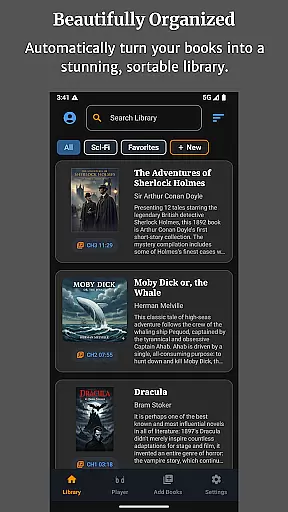
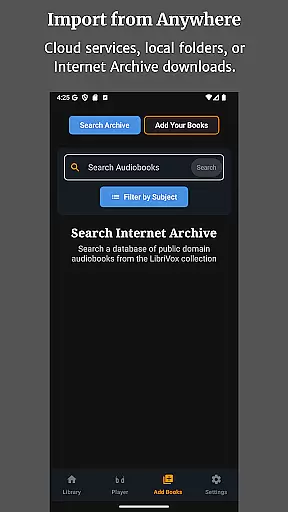
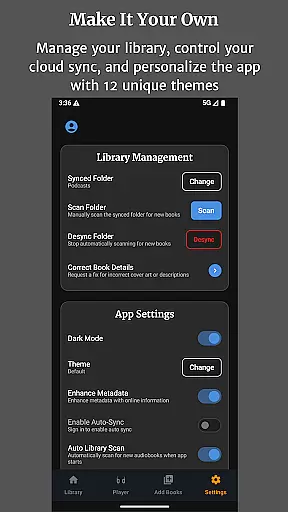
Audiobook Buddy is a comprehensive audiobook management app designed to transform your scattered audio files into an organized, visually appealing library. The app supports syncing from local folders and popular cloud services like Google Drive, OneDrive, and Dropbox, creating a unified listening experience.
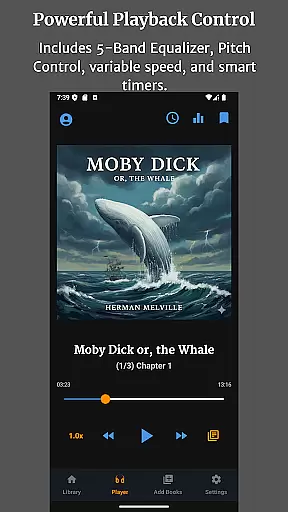
With advanced playback features including a 5-band Equalizer, Pitch Control, per-book speed settings, and a sleep timer, Audiobook Buddy ensures smooth and customizable listening. Users can also enjoy background playback, lock-screen controls, and a mini player for seamless navigation. Additionally, the app offers 11 themes for personalization and supports multiple languages such as English, German, French, and Japanese.
Ideal for audiobook enthusiasts, this app allows you to track listening progress, create collections, and access public domain books from LibriVox. Its full file support includes MP3, M4A, FLAC, and more, making it versatile for various audio formats.
Audiobook Buddy stands out with its smart library organization system that syncs audiobooks from multiple sources into one cohesive library. It supports cloud services like Google Drive, OneDrive, and Dropbox, allowing users to access their entire collection from anywhere.
The app's playback capabilities are robust, featuring a 5-band Equalizer, Pitch Control, and adjustable playback speeds for individual books. A sleep timer and background playback enhance user convenience, while full lock-screen controls and a mini player ensure easy management during commutes or workouts.
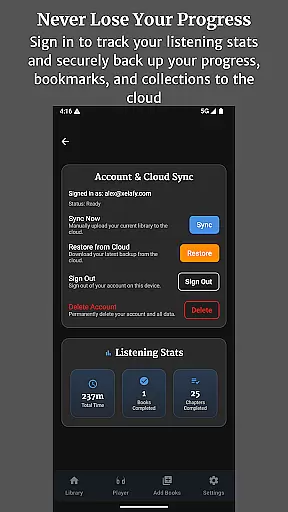
Customization options include 11 unique themes and instant language switching among English, German, French, and Japanese. Audiobook Buddy also provides detailed tracking of listening statistics, automatic cloud backups, and support for various audio formats including MP3, FLAC, and M4B, catering to diverse user needs.
Audiobook Buddy offers an extensive library of public domain audiobooks sourced from LibriVox, providing users with a vast selection of titles to choose from. Beyond the built-in library, the app supports importing personal files and ZIP archives, allowing users to expand their collection with their own content.
The app ensures copyright authenticity by focusing on public domain books and enabling users to import their legally acquired audiobooks. This approach guarantees that all content within the library is legitimate and respects intellectual property rights.
With full support for various audio formats such as MP3, M4A, FLAC, and more, Audiobook Buddy makes it easy to integrate a wide range of audiobooks into your library. The app reads metadata formats like CUE and NFO, ensuring accurate book information and cover art display.
Audiobook Buddy excels in format compatibility, supporting a wide array of audio formats including MP3, M4A, M4B, AAC, OGG, FLAC, WAV, and WMA. This comprehensive support ensures that users can enjoy their audiobooks regardless of the original file format.
In addition to audio formats, the app also handles metadata formats such as CUE, NFO, and TXT files. This feature allows for rich book details and proper organization within the library, enhancing the overall user experience.
The app's ability to read embedded cover art as well as external JPEG, PNG, and WebP images ensures that each audiobook is represented with accurate artwork. This visual element, combined with robust format support, creates a seamless and enjoyable library browsing experience.
User-friendly interface
Extensive format support
Cloud service integration
Advanced playback controls
Multi-language support
No DRM support
Limited free features
Occasional sync issues
Heavy on storage
Subscription required

Contains the 365 daily readings and everything other thing needed for catholics
 4.70
4.70
Pretty Moon information App with Complications and Tile
4.30
Words spoken by native English speakers and full definitions.
4.60
This is the pro version King James bible Offline that we have
4.70
Offline translator from english to spanish, and from spanish to english.
4.50
Provides location information of vehicle Shift Interlock releases.
4.30
What’s that bird? Just answer 5 questions, snap a photo, or record its song!
4.90
World's most comprehensive dictionary app: 13 languages, all online or offline!
4.80
A highly sophisticated app for all of your mobile reading—any format, any time
4.50
Plan of Life that Saint Josemaría recommended
4.80
Liturgy of the Hours totally off-line
4.80
The dynamic dictionary/reference app for piano chords and scales!
4.80
Translate into 100+ languages with the world’s most accurate AI translator.
4.70
"Five Dr. Seuss titles in one omBook!"
4.60
Read aloud texts, audiobooks, PDFs or any eBook with text to speech AI audio
4.60
Read the Quran in Arabic alongside its translation, with color coded Tajweed.
4.50
Bilingual dictionary with English translations of Modern Standard Arabic words.
4.30
Prime novels await! Fantasy & Romance on JoyRead. Immersive reads!
4.20
Enjoy your favorite books
3.50


User Reviews