
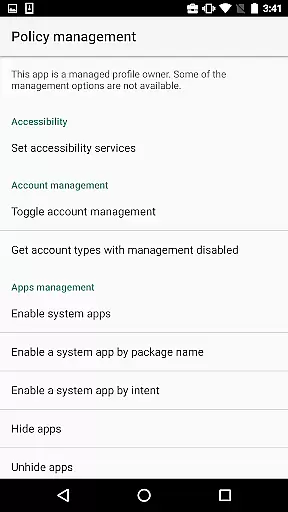
Test DPC is a specialized development tool designed exclusively for Android Enterprise management testing. This application allows developers to simulate and test managed device environments, including both device owner scenarios and managed profiles.
The app provides comprehensive policy control features, enabling developers to configure work profiles, implement application restrictions, and manage security policies. These capabilities make it an essential tool for enterprise mobility management solution testing.
While not intended for production use, Test DPC serves as a valuable reference implementation for developers building commercial Device Policy Controllers (DPCs). Its open-source nature and extensive feature set help ensure enterprise apps will function correctly in managed environments.
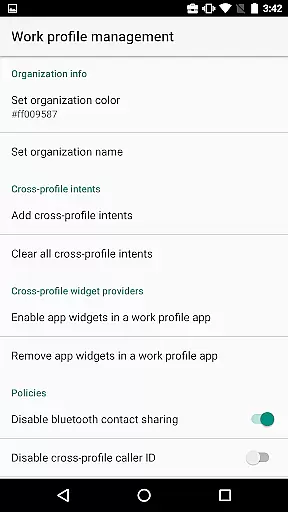
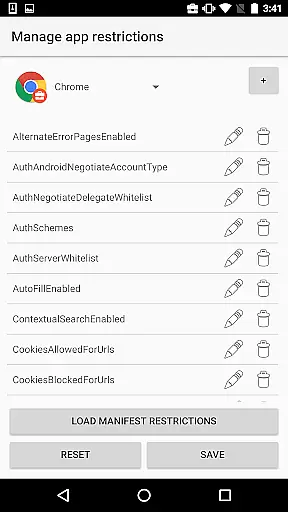
Test DPC offers a complete set of enterprise management features specifically designed for development and testing purposes. The application's primary capability is its comprehensive policy management system, which allows developers to configure various enterprise mobility scenarios.
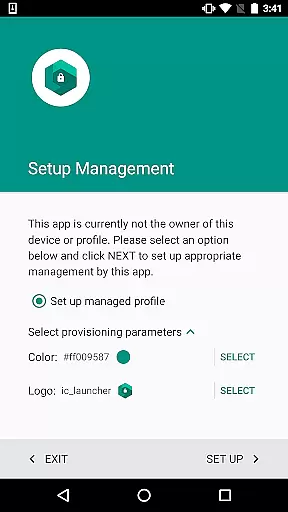
Key functionalities include work profile creation, application restriction management, security policy enforcement, and permission controls. Developers can also test certificate management, account provisioning, and lock task mode functionality. The app supports multiple deployment scenarios including BYOD and COPE (Corporate Owned Personally Enabled) devices.
As an open-source reference implementation, Test DPC provides valuable insights into proper DPC development practices. Developers can examine the source code to understand best practices for implementing Android Enterprise management solutions.
Functionality completeness refers to the extent to which an application provides features that cover all intended use cases. For Test DPC, this means offering developers a comprehensive set of tools to simulate various managed contexts within Android Enterprise environments.
The app allows users to configure device policies, set up work profiles, and manage security policies. These features provide extensive coverage for testing how applications behave under different enterprise conditions. This ensures that developers can thoroughly evaluate their apps' performance in both personal and work environments.
Test DPC's functionality includes enabling or disabling system features, setting application restrictions, and controlling security policies. Such capabilities allow developers to test a wide range of scenarios, ensuring their apps are robust and reliable when deployed in real-world enterprise settings.
By providing these complete functionalities, Test DPC enables developers to identify potential issues early in the development process. This leads to more stable and secure applications being released for actual enterprise use.
Usability focuses on how easily users can interact with an application, while operational smoothness pertains to the seamless execution of tasks without interruptions. Test DPC demonstrates strong usability by presenting its complex functionalities through a straightforward interface designed specifically for developer needs.
The application offers clear options for setting up work profiles and managing policies, making it accessible even to those new to Android Enterprise development. Its organized layout helps users quickly find and utilize necessary features for their testing requirements.
Operational smoothness is evident in how Test DPC handles policy changes and configuration updates without requiring device restarts or causing system instability. Developers can apply modifications and immediately observe results, streamlining the testing process.
This combination of user-friendly design and reliable operation makes Test DPC an invaluable tool for Android Enterprise developers. They can focus on testing their applications' behavior in managed environments without being hindered by complicated interfaces or technical disruptions.
Comprehensive policy testing
Open-source reference
Enterprise feature support
Developer friendly
Android Enterprise ready
Not for production
Limited UI design
Technical expertise required
No official support
Development only

If you are looking for melon playground mod that fun you deffinitely try our app
 2.70
2.70
Collection of high-quality, trendy skins and outfits!
4.2
Identify securely online
3.10
Easily evaluate the performance of Scandit's barcode and ID scanning SDK
4.10
Zlink Carplay Android a mirror link app with a Carplay interface style
4.1
Enjoy hours of entertainment with our Roblox mobile games app
4.5
a wireless controller that provides a seamless and gaming experience for players
3.80
Endoscope camera an app to connect with endoscope cam or any device
3.30
Phone Software Update Quick Checker helps you to keep your phone apps up to date
4.50
TV USB connector app provides you a seamless cast option from your phone to tv.
4.70
An essential GFX utility developed for specific FPS mobile games
4.50
Enjoy Minecraft Mod Scary Neighbor Granny for Minecraft PE.
4.30
An impressive collection of tools, characters, weapons, skins and more!
4.30
Android secret code for smart phone, mobile codes, with secret codes app
4.20
Connect and find your Smart Tag 2 devices through our app.
3.60
CloudEye 365 is a easy-handling APP
3.60
Mobs maker Minecraft help MCPE creators make their own mob by using Blockbench
3.50
Simulator of real black light
3.50
Turn your phone into a wireless Xbox controller – play, stream & control anytime
4.2


User Reviews