
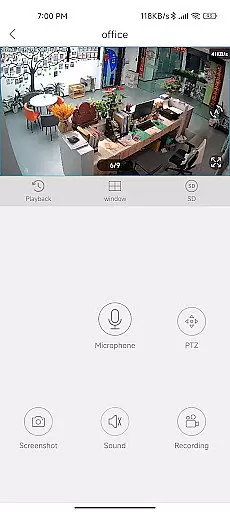
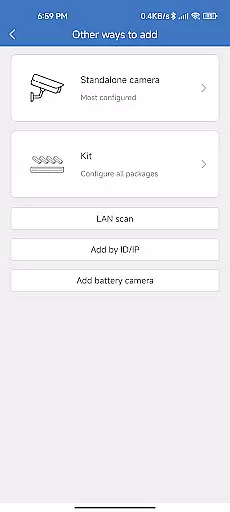
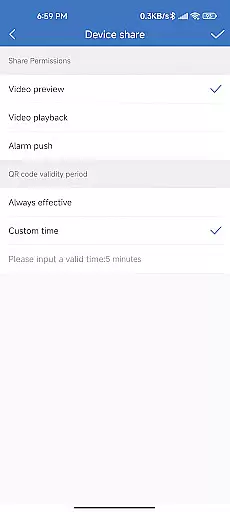
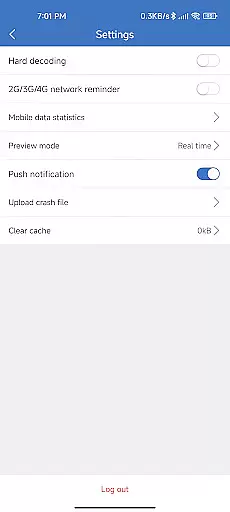
CloudEye 365 is a cutting-edge remote monitoring application designed to provide users with seamless security solutions. The app allows users to access live video feeds from their connected devices, ensuring real-time surveillance whether they are at home or away. With its intuitive interface and robust functionality, CloudEye 365 ensures that users can monitor their properties effortlessly.
One of the standout features of CloudEye 365 is its ability to send instant notifications whenever abnormal movement or suspicious activity is detected by the connected devices. This proactive approach helps mitigate potential risks to personal security and property. Whether for residential or commercial use, CloudEye 365 serves as an essential tool for maintaining peace of mind throughout the year.
CloudEye 365 offers a comprehensive suite of features tailored for optimal remote monitoring. Users can access high-quality live video feeds directly through the app, providing them with real-time insights into their premises. The app supports multiple device connections, allowing users to manage and monitor various locations simultaneously.
In addition to live monitoring, CloudEye 365 incorporates intelligent motion detection technology. When any linked device detects unusual activity, the app immediately sends a notification to the user's smartphone. This feature ensures that users are always aware of potential security threats. Furthermore, the app provides cloud storage options for recorded footage, enabling users to review past incidents conveniently.
The app also emphasizes user experience with its easy-to-navigate interface and customizable settings. Users can adjust notification preferences, set up specific alert zones, and configure other parameters to tailor the app to their unique needs. These capabilities make CloudEye 365 a versatile and indispensable tool for modern security requirements.
Functionality completeness is a critical aspect of any application, especially for CloudEye 365, which serves the purpose of remote monitoring and security. This app ensures that users have access to live feeds from their surveillance devices no matter where they are.
The app's functionality spans from providing real-time video feeds to sending instant notifications when any abnormal movement or suspicious activity is detected by the related device. This comprehensive approach allows users to monitor their properties with ease and confidence.
CloudEye 365 covers various essential features such as motion detection alerts, live video streaming, and integration with other smart home devices. These features collectively contribute to a robust security solution that operates seamlessly throughout the year.
By offering a complete suite of functionalities, CloudEye 365 ensures that users can maintain their personal security and protect their properties without any gaps in coverage. This makes it an indispensable tool for both home and office environments.
Usability and operational smoothness are vital for ensuring that users can effectively utilize all the features offered by CloudEye 365. The app is designed with user-friendly interfaces that make navigation intuitive and straightforward, allowing users to quickly access the live feed and other security features.
Operational smoothness is achieved through optimized performance, ensuring that the app runs efficiently without lags or crashes. This reliability is crucial for a security application, as any downtime could result in missed alerts or delayed responses to potential threats.
CloudEye 365 also provides seamless integration with various devices, enhancing its usability. Users can easily connect their surveillance cameras and receive notifications on their smartphones, making the entire process hassle-free and efficient.
Overall, the combination of intuitive design and reliable performance ensures that CloudEye 365 delivers a smooth and dependable user experience, reinforcing its role as a vigilant guardian for your property 365 days a year.
User-friendly interface
Real-time notifications
Multi-device support
Cloud storage integration
Customizable settings
Limited free cloud storage
Requires stable internet
Premium features cost extra
Occasional connectivity issues
Device compatibility constraints

Android secret code for smart phone, mobile codes, with secret codes app
 4.20
4.20
With Endoscope Camera Connector you can connect your phone with endoscope cam
3.70
use your smartphone as Remote control drones .
4.20
charging your phone by other phone easly
4.00
Explore The Holy Quran Majeed for Muslim. Listen to MP3 Quran & Al Quran Kareem.
4.80
Al QURAN-القرأن الكريم app to read Quran offline just like an actual Quran book
4.30
Turn your phone into a wireless Xbox controller – play, stream & control anytime
4.0
Simulator of real black light
3.50
Now Available on Android ™
3.40
TV USB connector app provides you a seamless cast option from your phone to tv.
4.70
Expo is a free & open source platform to build apps using JavaScript and React.
4.70
The Free Catholic Latin American Bible in complete Spanish
4.60
Phone Software Update Quick Checker helps you to keep your phone apps up to date
4.50
Barcode scanning made simple!
4.40
Wireless reverse charging using phone now is possible
4.30
The best PS2 games from your childhood come to life in their mobile version!
4.00
Connect and find your Smart Tag 2 devices through our app.
3.60
DamonSx2 is the open Source LGPL Emulator
3.20
A great tool help you to format Micro SD memory Card
3.10


User Reviews