
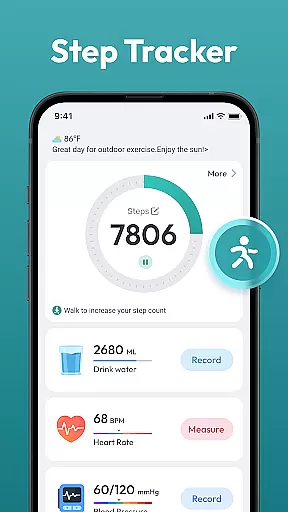
Step Counter - Pedometer App is a comprehensive health and fitness tool designed to help users track their daily physical activity. This app automatically counts steps and measures distance traveled, making it ideal for those looking to monitor their walking or running routines.
In addition to basic step counting, the app offers advanced features such as daily, weekly, and monthly activity charts, training courses, and personalized plans. These functionalities enable users to set and achieve fitness goals, such as reaching 10,000 steps per day, without the need for any external wearable devices.
Whether you're aiming to lose weight, maintain a healthy lifestyle, or simply stay active, Step Counter - Pedometer App provides an all-in-one solution that caters to users of all ages and fitness levels.
Step Counter - Pedometer App stands out with its automatic step counting feature, which works seamlessly on most Android devices. The app's compatibility ensures that a wide range of users can benefit from its functionality without needing additional hardware.
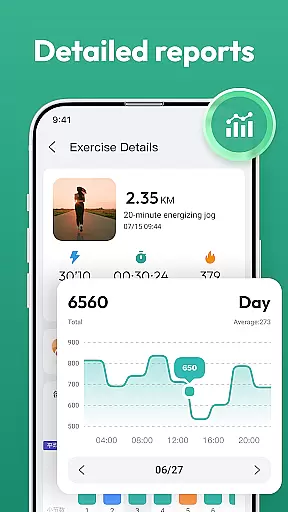
One of the key highlights is the app's ability to present data through detailed charts and graphs. Users can view their progress over different timeframes—daily, weekly, or monthly—allowing them to analyze trends and adjust their routines accordingly. Additionally, the inclusion of training programs and plans helps users structure their workouts effectively.
The user-friendly interface makes navigation intuitive, while the app's capability to track various health metrics adds depth to its utility. By consolidating essential fitness data in one place, Step Counter - Pedometer App empowers users to take control of their health journey.
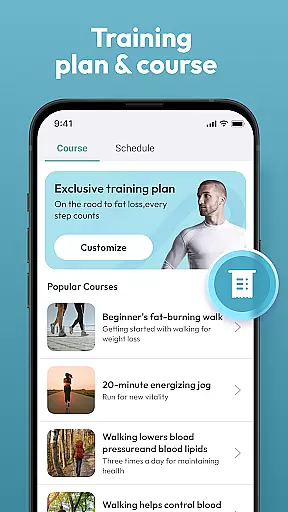
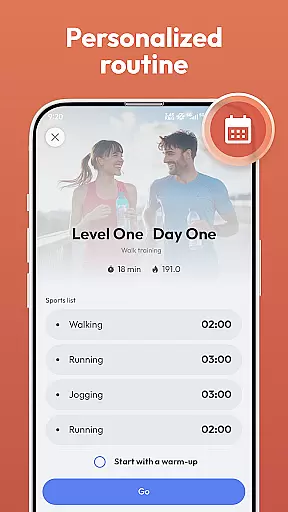
Personalized planning is a cornerstone of effective health and fitness management, allowing users to tailor their exercise routines to individual needs and goals. Step Counter - Pedometer App excels in this area by offering training courses and plans that adapt to various fitness levels.
The app's automatic step counting and distance tracking features provide a solid foundation for creating personalized workout plans. By analyzing daily, weekly, and monthly activity data, the app helps users set realistic goals and adjust their fitness strategies accordingly.
Users benefit from a customizable experience that evolves with their progress. Whether aiming for weight loss or striving to reach a daily goal of 10,000 steps, the app's intelligent algorithms ensure that each plan remains relevant and challenging.
This personalized approach not only enhances motivation but also improves long-term adherence to fitness routines. With no need for additional wearable devices, Step Counter makes personalized fitness planning accessible to everyone.
Visualizing progress is crucial for maintaining motivation and tracking improvements in any fitness journey. Step Counter - Pedometer App offers comprehensive progress visualization through its detailed charts and achievement tracking system.
The app's graphical representations display daily, weekly, and monthly activity data, providing users with clear insights into their performance trends. These visual tools help identify patterns, track consistency, and celebrate milestones, making the fitness journey more engaging and rewarding.
By automatically recording various health data points and achievements, the app creates a complete picture of user progress. This systematic approach to tracking helps users understand their fitness evolution and make informed decisions about their routines.
The combination of visual progress indicators and achievement milestones creates a powerful feedback loop. This feature not only enhances user engagement but also provides tangible evidence of improvement, encouraging continued commitment to health and fitness goals.
Automatic step tracking
User-friendly design
No external device needed
Detailed progress charts
Free to use
Limited to Android
Drains battery
No live coaching
Occasional inaccuracies
Ads present

“Overcoming pain based on EMDR” helps you to alleviate chronic pain and stress.
 4.10
4.10
For Absolute Novices to Strength Training. Simple. Effective.
4.40
Easy reconstitution calc for mixing peptides and creating protocols
4.70
Histamine intolerance, low FODMAP diet and irritable bowel syndrome (IBS)
4.00
Interval timer for High Intensity Interval Training, Tabata and Circuit Training
4.20
The Sleep Miracle Sound Machine: Soothes baby to sleep with a gentle "Shhh"
3.00
A brain game that moves you
4.70
Pupillary distance PD with camera quick and easy, checking glasses frames on you
3.70
Jogging app for calorie counter and distance tracker. Running app to lose weight
4.20
Power-lifting, weightlifting and Wendler 531 app to track your workout program.
4.90
App to stop smoking slowly or now with a motivational badges and helpful tips
4.80
Mind on steroids - relaxation, productivity, meditation and sleep!
4.60
Period Tracker, the easiest way to track your periods!
4.50
Pack of 66 calming lullabies for smooth fall asleep and relaxation
4.10
Find Paid Clinical Trials In Your Area
3.70
FitCloudPro takes care of your health every minute.
3.70
Enjoy the Gluten Free living with the best app. SCAN the barcodes & SEARCH.
3.60
Measure real-time wrist & ambient temperature with your Galaxy Watch (Wear OS)
3.20
Using Recognise™ has been shown to reduce pain and improve performance.
4.0


User Reviews