
Sched is a leading platform for session registration and attendance management, designed to streamline the organization of complex multitrack events. This app allows event organizers and attendees to manage all event details in one place, enhancing the overall event experience.
With features like a full schedule display, personalization options, a comprehensive directory of speakers, and offline caching, Sched ensures users can efficiently access and manage event information. Whether you are an event organizer aiming to deliver a seamless event or an attendee looking to maximize your event participation, Sched offers tools that cater to your needs.
The app's vision is to transform the way events are experienced, making them more interactive and less cumbersome. By centralizing event management and offering user-friendly functionalities, Sched helps users focus on what truly matters - engaging with the event content and community.
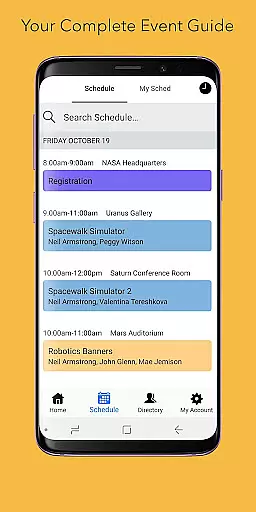
Sched boasts a variety of robust features tailored to enhance event management and participation. One of its standout capabilities is the full schedule view, which lets users browse entire event schedules conveniently, eliminating the need for physical event guides.
Personalization is at the core of Sched's offerings. Attendees who have created schedules online can log in to view and modify their plans on-the-go. New users can sign up for public events and instantly save sessions to their personalized schedules, ensuring they never miss out on key sessions.
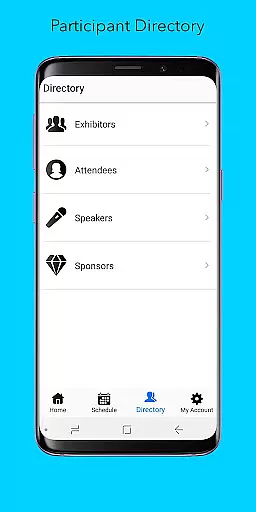
In addition to scheduling, Sched provides a detailed directory of speakers and exhibitors, allowing users to explore professional profiles and connect with industry experts. The offline caching feature guarantees that users always have access to their schedules, even without an internet connection. These features collectively ensure that Sched delivers a reliable and enriching event experience.
Task creation and detail customization are essential features for event management platforms like Sched. This functionality allows event organizers to create detailed sessions, workshops, or presentations with specific information such as time, location, speaker details, and session descriptions.
Sched offers a comprehensive suite of tools for task creation. Organizers can easily input session details, categorize events, and manage multiple tracks within a single platform. The ability to add rich descriptions, multimedia content, and related documents enhances the attendee experience while providing all necessary information in one place.
The benefits of this feature extend beyond mere organization. Attendees can personalize their schedules based on detailed session information, making it easier to plan their day and prioritize sessions that match their interests. This level of customization leads to better engagement and overall satisfaction with the event.
By providing robust task creation and customization options, Sched empowers event organizers to deliver well-structured, informative events while enabling attendees to maximize their participation through personalized scheduling.
Reminder settings play a crucial role in ensuring attendees don't miss important sessions at events managed through platforms like Sched. These settings allow users to set up timely notifications for upcoming sessions, helping them stay organized throughout the event.
Sched provides flexible reminder options that cater to different user preferences. Attendees can choose when they want to receive reminders - whether it's minutes before a session starts or hours ahead - allowing them to manage their time effectively. Additionally, these reminders can be synced with personal calendars, further streamlining schedule management.
This feature significantly enhances the user experience by reducing the likelihood of missing key sessions due to oversight or poor planning. It also helps maintain engagement levels throughout the event duration as attendees can seamlessly transition between sessions without losing track of time.
With its thoughtful implementation of reminder settings, Sched ensures that participants remain fully engaged and informed about their scheduled activities, contributing to a more successful and enjoyable event experience overall.
User-friendly interface
Comprehensive event management
Offline functionality
Real-time updates
Customizable schedules
Limited free features
Occasional sync issues
Advanced features require subscription
Interface can be complex for new users
Customer support response time

Manages display and transfer of tickets from the Mundo Tickets platform
 3.80
3.80
The calendar app in this 2026 year see all dates.
4.20
CUE Live utilizes ultrasonic sound waves to sync devices at CUE enabled events
4.80
Browse events, find transportation, keep up with the latest news from your team
4.1
Get live football here
4.30
No invest, Easy way to earn USDT through crypto cloud mining
3.80
Find EDM shows near you! See your favorite artists live, and discover new music.
4.90
Microsoft Ignite is an event that showcases latest advancements in technology
4.00
Discover events & experiences in NYC, LA, Chicago, DC, Miami and more!
4.70
TodayTix is the easiest way to get tickets to the best shows in your city.
4.90
Plan your wedding for free on the go: vendors, budget, website and checklists!
4.80
Save money on concert, sport, and theater tickets, and discover upcoming events.
4.80
Buy and Sell Tickets for Concerts, Sports, and Theater.
4.70
Create Wedding Invitation and Wedding Anniversary Cards using our app
4.60
Wedding planner app with wedding venues, wedding checklist, countdown & budget.
4.60
PheedLoop Go! is the mobile event app for events powered by PheedLoop.
4.40
Track birthdays, habits & goals. Unlimited countdowns and count-ups
4.20
Buy and sell tickets to sports, concerts, theater, festivals, and comedy events
4.10
TV Garden is a video player to play your own TV streams from around the world!
4.1


User Reviews