
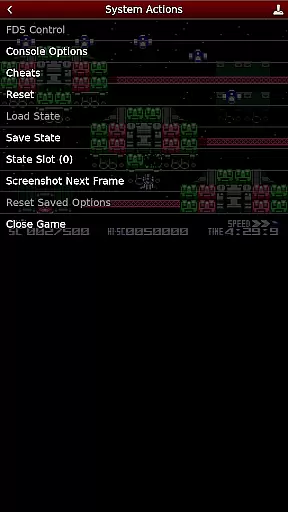
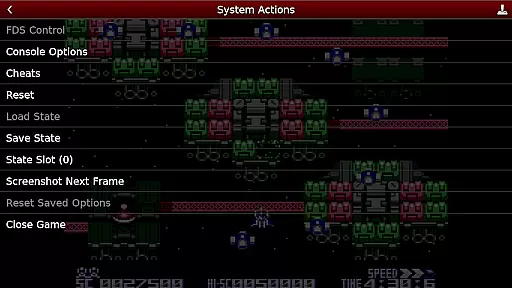
NES.emu is an advanced open-source NES emulator, also known as Famicom in Japan. It offers a minimalist UI with a focus on low audio and video latency, making it suitable for a wide range of devices from the original Xperia Play to modern devices like the Nvidia Shield and Pixel phones.
With support for various file formats including .nes, .unf, optionally compressed with ZIP, RAR, or 7Z, and Famicom Disk System emulation using .fds files, this emulator provides a versatile gaming experience. Users can enjoy features such as VS UniSystem support, FCEU-compatible cheat files, Zapper/Gun support, configurable on-screen controls, and Bluetooth/USB gamepad & keyboard support.
This emulator is ideal for retro gaming enthusiasts who wish to relive classic NES games on their modern devices with minimal latency and high compatibility.
NES.emu stands out with its comprehensive feature set tailored for an optimal emulation experience. The app supports multiple file formats such as .nes, .unf, and .fds, with optional compression formats like ZIP, RAR, or 7Z, ensuring that users can load games from different sources easily.
One of the key highlights is the Famicom Disk System emulation, which requires selecting BIOS in the options. Additionally, the emulator includes VS UniSystem support, allowing users to insert coins by pressing Start. Cheat functionality is available through FCEU-compatible cheat files (.cht extension) with editing capabilities.
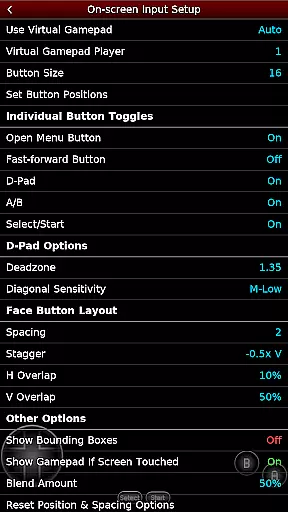
The emulator also boasts Zapper/Gun support, where users can touch the screen to fire and touch & hold outside of the display area to simulate firing away from the TV. Configurable on-screen controls and support for Bluetooth/USB gamepads & keyboards compatible with HID devices recognized by the OS enhance the user experience further.
Arcade authenticity and nostalgia are essential elements for any emulator aiming to recreate the classic gaming experience. NES.emu, as an advanced open-source NES emulator, excels in delivering this by accurately emulating a wide range of devices from the original Xperia Play to modern ones like the Nvidia Shield and Pixel phones.
The app supports .nes and .unf file formats, optionally compressed with ZIP, RAR, or 7Z, ensuring that users can enjoy a vast library of games just as they remember them. Additionally, it offers Famicom Disk System emulation using .fds files, VS UniSystem support, and Zapper/Gun functionality, which all contribute to bringing back the authentic arcade feel.
By including configurable on-screen controls and supporting Bluetooth/USB gamepads and keyboards, NES.emu enhances the nostalgic experience while maintaining the convenience of modern technology. This blend of old-school charm with contemporary features ensures that users can relive their favorite arcade moments seamlessly.
Control responsiveness is crucial for an optimal gaming experience, especially in arcade games where precision and timing are key. NES.emu addresses this by offering highly responsive controls that cater to both touch screen interactions and external devices.
The emulator supports a variety of input methods including touch screen controls, which allow users to tap to fire in Zapper/Gun games, and touch & hold outside of the display area to simulate firing away from the TV. This flexibility ensures that users can interact with their games in a way that feels natural and intuitive.
In addition to touch controls, NES.emu is compatible with Bluetooth/USB gamepads and keyboards, including popular models like Xbox and PS4 controllers. This compatibility guarantees that players can enjoy low-latency, high-precision control schemes that enhance their gaming sessions, making every action feel immediate and accurate.
Low audio/video latency
Versatile file format support
Famicom Disk System emulation
Configurable on-screen controls
Bluetooth/USB gamepad support
No ROMs included
Requires technical knowledge
Limited customer support
Compatibility issues
Complex setup process

Play, Craft and Share your Endless Runner Levels on Kooply Run: Subway Craft
 4.50
4.50
PC Engine/TurboGrafx-16 Emulator
4.50
Meet Snake Run Race! Slither through an obstacle course in our fun running game!
4.70
Play fun multiplayer games with friends on one device! Two, Three, Four players!
4.60
Save the Galaxy from galaxiga alien - Classic arcade shooter game
4.60
Full featured version of Pizza Boy A (GBA emulator)
4.80
Jump and fly your way through danger in this rythm-based action platformer!
4.70
Original Space Adventure Experience
4.60
Save the galaxy from alien shooter in classic galaxy shooter-classic arcade game
4.80
Local offline 2 3 4 player multiplayer minigames - race, tanks, football
4.60
Merge bowmasters to win the bow and arrow war! Play the fun archery game!
4.60
Jump and fly your way through danger in this rythm-based action platformer!
4.50
Granny keeps you locked in her house.
4.30
Collect layers in running game & build the biggest slinky toy to beat the giant!
4.30
Antistress & relaxing games,stress relief; Antistress toys, calming games.
4.20
Enter Double Dragon Trilogy, a compilation of the beloved arcade series
4.10
John GBC is GB/GBC emulator. This emulator is easy to use.
3.80
John GBA is GBA emulator. This emulator is easy to use.
3.10
Divine powers at your fingertips! An innovative and frantic shoot-'em-up!
4.4


User Reviews