
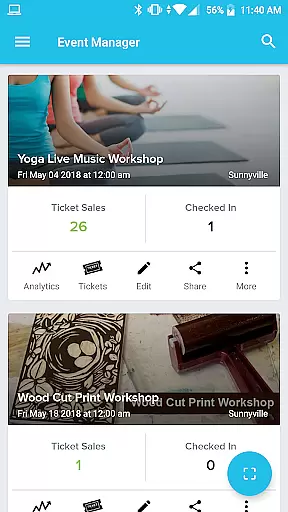
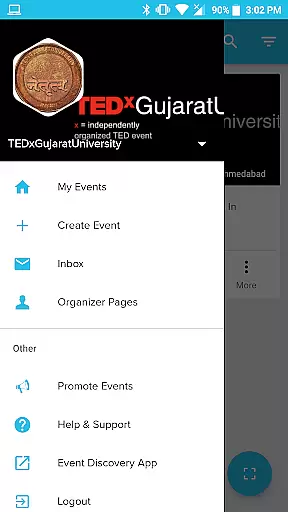
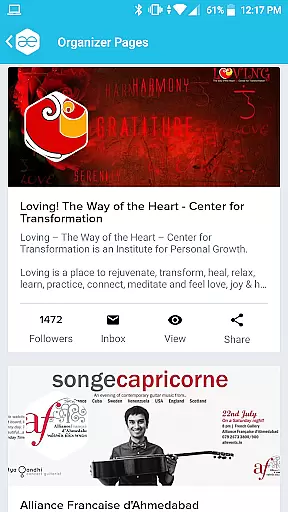
Event Manager - AllEvents.in is a comprehensive event management application designed specifically for event organizers seeking to enhance their event's reach and simplify the management process. This app allows users to effortlessly track every attendee, manage ticketing, and monitor crucial metrics such as page visits, number of attendees, tickets sold, and revenue generated.
The app features an intuitive dashboard that provides detailed analytics for each event, including performance graphs, total views, and attendee statistics over time. Additionally, it offers promotional tools to drive traffic to events, QR code scanning for attendee verification, lead generation capabilities, and seamless check-in management during events. With its 'Pay at Venue' option and multi-profile management system, Event Manager - AllEvents.in ensures maximum convenience and flexibility for organizers.
This powerful tool is particularly beneficial for large-scale events where tracking individual attendees and managing multiple profiles can be challenging. By providing real-time insights and easy access to essential data, Event Manager - AllEvents.in empowers organizers to make informed decisions and optimize their event strategies effectively.
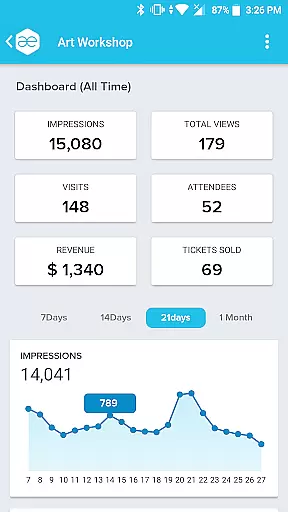
Event Manager - AllEvents.in stands out with its robust set of features tailored for efficient event management. One of its key highlights is the comprehensive dashboard that displays a performance graph for each event, showing metrics like total views, number of attendees, revenue, and sold tickets over a specific period. This feature enables organizers to gain deep insights into their event's success and make data-driven decisions.
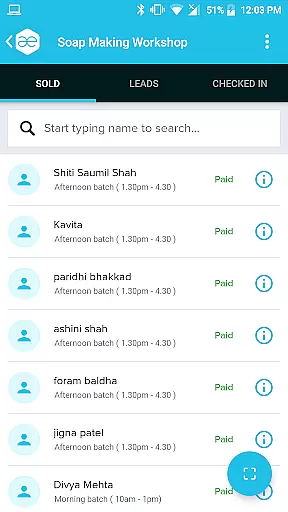
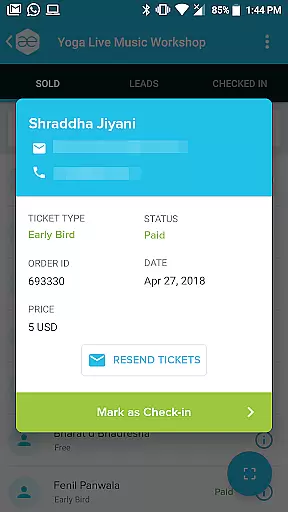
In addition to the dashboard, the app allows users to view all ticket buyers and their payment statuses, maintain records of attendees with search functionality by ticket ID or QR code scanning, and generate leads for upcoming events by distinguishing between impressions and potential leads. The app also facilitates smooth check-in processes during events, helping organizers differentiate between attendees who showed up and those who did not.
Other notable features include the ability to manage different organizer profiles for various types of events, promote events through diverse promotional plans, and handle all event ticketing and management solutions such as verifying tickets, managing check-ins, and offering 'Pay at Venue' options. These functionalities collectively ensure that organizers have all the tools they need to run successful events efficiently.
Task creation and detail customization are essential for event organizers who need to manage multiple events with precision. The All Events Organizer app excels in this area by providing a comprehensive dashboard for each event. This dashboard not only allows organizers to track the performance of their events but also customize various details to suit their needs.
The app's interface is designed to give organizers an overview of their event's performance graph, displaying metrics such as total views, number of attendees, revenue generated, and tickets sold over a period of time. This level of detail enables users to make informed decisions about their events, ensuring that every aspect is tailored to achieve the best possible outcome.
Moreover, the ability to view and manage attendee information adds another layer of customization. Organizers can see who has purchased tickets, check payment statuses, and maintain records for each attendee. With features like ticket ID search and QR code scanning, verifying attendee presence at an event becomes seamless and efficient.
In essence, the All Events Organizer app empowers users to create and customize event tasks with remarkable ease and accuracy, making it an indispensable tool for meticulous event management.
Effective reminder settings are crucial for keeping both organizers and attendees on track with upcoming events. The All Events Organizer app offers robust solutions in this regard, ensuring that no important detail or deadline is missed. By leveraging the app's advanced features, organizers can set up timely reminders for various tasks associated with their events.
One standout feature is the ability to promote events through various promotional plans directly from the app. These promotions come with built-in tracking capabilities, allowing organizers to monitor the success of their campaigns and adjust reminder settings accordingly. This ensures maximum visibility and engagement leading up to the event date.
Additionally, the app facilitates attendee management by offering options to send reminders about unpaid payments or incomplete registrations. Organizers can easily mail or call users to follow up, thus maintaining a high level of attendance and participation. Such proactive measures significantly enhance the overall efficiency of event planning and execution.
By integrating sophisticated reminder settings, the All Events Organizer app provides peace of mind, knowing that all critical aspects of event management are covered seamlessly and effectively.
User-friendly interface
Comprehensive analytics
QR code scanning
Lead generation
Multi-profile management
Limited customization
No offline mode
Occasional bugs
Premium features cost
Steep learning curve

An App for Bhutanese
 4.2
4.2
The Ultimate Tournament Hub
4.70
It is an Event Planning Application.
4.0
Community for Mods, Addons, Melsaves, Melmods for Melon Playground
4.0
Listen Full Quran MP3 Offline - Qibla Compass, Salah Timing & 99 Names of Allah
4.60
Clubs, Festivals, Discounted Tickets, Guest Lists & VIP Tables
4.90
Invitation Card Maker, Design & share wedding, birthday & party invites fast
4.40
Fast Scans. Happy Fans. For Every Hometown!
4.60
Design Invitations & Cards for Any Occasion
4.80
TodayTix is the easiest way to get tickets to the best shows in your city.
4.90
Plan your wedding for free on the go: vendors, budget, website and checklists!
4.80
Find Live Event Ticket Deals to Sports, Concerts, Festivals, & Comedy For Less!
4.80
Greeting card maker with photos best app| Birthday cards| All wishes eCards FREE
4.50
Connect with an ecosystem of 5M+ eventgoers and organizers.
4.50
Microsoft Build is an annual developer conference hosted by Microsoft
4.20
Buy tickets for any event!
3.90
Purchase line-skip passes, drinks, cover, and more at bars and clubs
3.50
TV Garden - World Live TV : Play & cast your videos seamlessly!
3.20
Thanksgiving Wishes, Thanksgiving Stickers & Animated GIF for Whatsapp Stickers
4.3


User Reviews