
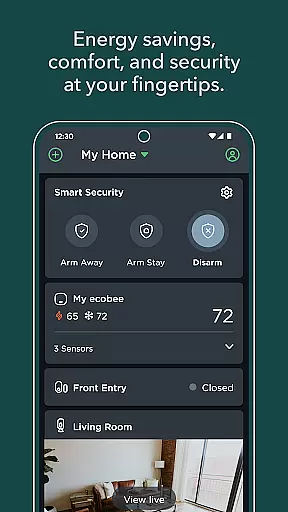
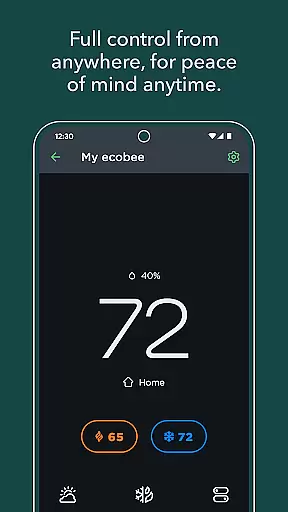
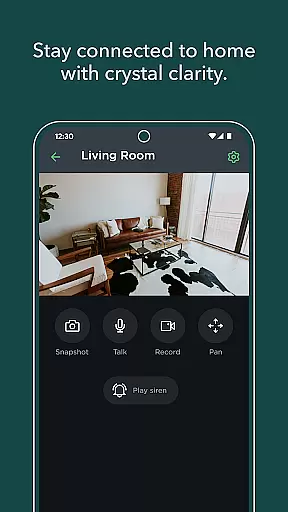
ecobee is a smart home management application designed to enhance your living experience through adaptive learning technology. The app allows you to control various ecobee devices including smart thermostats, SmartCameras, and SmartSensors directly from your mobile device. With its intelligent features, ecobee creates a personalized environment that adjusts based on your daily routines and preferences.
One of the key functionalities is the ability to customize your thermostat schedule for optimal energy savings while maintaining comfort. Additionally, the Autopilot feature enables smart home automations that further streamline your home management. Whether you're at home or away, ecobee provides both comfort and security with real-time monitoring and alerts for entryways and other critical areas of your house.
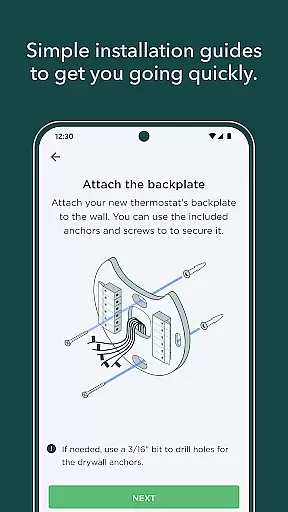
This app is particularly useful for homeowners looking to reduce their energy bills without compromising on comfort. By offering step-by-step installation instructions and integration with utility company rebates, ecobee makes smart home technology accessible and cost-effective for everyone.
ecobee stands out with its comprehensive suite of smart home features. The app's most notable capability is its device control functionality, which lets users manage multiple ecobee products such as thermostats, cameras, and sensors from a single interface. This unified control system simplifies home management and ensures all devices work together seamlessly.
The customization options within ecobee are extensive. Users can create detailed thermostat schedules that automatically adjust based on their daily routines, leading to significant energy savings. The Autopilot feature takes this further by enabling advanced home automations that adapt to changing conditions and user behaviors. Furthermore, the app provides intelligent monitoring capabilities with instant alerts for suspicious activities around the house.
What sets ecobee apart is its focus on user empowerment through education and financial incentives. The app includes tools to help users find eligible rebates from their utility companies, making smart home technology more affordable. This combination of sophisticated automation, comprehensive device control, and cost-saving opportunities demonstrates ecobee's commitment to creating smarter, more efficient homes.
When it comes to managing your home environment, the authenticity and accuracy of device listings are crucial. The ecobee app ensures that every connected device, from smart thermostats to SmartCameras and SmartSensors, is properly registered and verified. This guarantees that users have a reliable overview of their home's ecosystem.
The app provides step-by-step installation instructions for new devices, ensuring proper setup and integration into your smart home system. By following these detailed guidelines, users can trust that all devices are correctly installed and functioning as intended. This meticulous attention to detail enhances the overall reliability of the home management experience.
With verified device listings, homeowners can confidently monitor and control various aspects of their home. Whether adjusting the thermostat schedule or receiving intelligent alerts about entryways and windows, users know they are interacting with genuine devices. This level of authenticity provides peace of mind and ensures optimal performance of home management features.
Effective home management goes beyond simple device control; it involves creating a responsive and adaptive living environment. The ecobee app excels in this area by offering advanced features that learn and adapt to user behaviors and preferences. This smart home solution provides comfort when you're home and peace of mind when you're away.
One of the standout features is Autopilot, which allows users to create sophisticated smart home automations. These automations can significantly enhance energy efficiency while maintaining optimal comfort levels. Additionally, customizable thermostat schedules help homeowners save energy without sacrificing convenience or comfort.
The app also offers intelligent monitoring capabilities, enabling users to keep track of entryways, windows, drawers, and cabinets through smart alerts. Furthermore, ecobee helps users find eligible rebates on their energy bills by connecting them with utility companies. These comprehensive home management features make the ecobee app an invaluable tool for modern homeowners seeking both convenience and cost savings.
User-friendly interface
Comprehensive device integration
Energy-saving features
Advanced automation options
Real-time security monitoring
Requires initial setup time
Premium features may incur additional costs
Dependent on stable internet connection
Limited compatibility with non-ecobee devices
Occasional software updates needed

Use Home by ShowingTime to easily manage showings, tours, feedback and more
 3.60
3.60
Design house plans in 2D & 3D, style furniture, and preview renovation layouts
3.70
Download today to join the community to help bring lost pets home faster.
4.70
AI floor creator to design your dream house, plan rooms & style your home
4.00
USHUD.com helps you find the best homes for sale in your area
4.00
Find contractors for all home renovation projects. Remodeling, repair, and more.
4.20
Control your Vivint Smart Home with the next generation Vivint App.
4.30
A Smarter Home in Seconds
4.70
Find homes for sale and apartments for rent in the best neighborhood.
4.70
View houses and apartments for rent, updated daily.
4.80
Convert your Phone to HiSense Smart TV Remote Control
4.70
Control your Daikin, Amana & Goodman heating & cooling systems from anywhere
4.40
WiZ smart light system
4.40
Fully control your Philips TV with this all-in-one remote control app.
4.20
Smart AI plant care schedules, Real plant experts, support & Thriving community!
4.20
Find the perfect paint color with advanced tools to explore and visualize color.
3.80
This Fire TV Remote control's your Fire TV Device and Insignia Fire TV Remote
3.70
Find paints using a Color Muse & ColorSnap® Match
3.60
PRO Version of GLB AR Viewer
4.2


User Reviews