
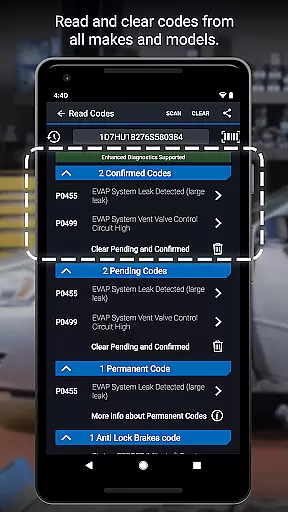
BlueDriver OBD2 Scan Tool is a professional-grade automotive diagnostic application that transforms your smartphone or tablet into an advanced vehicle scanning device. When paired with the BlueDriver Bluetooth Sensor, it provides comprehensive diagnostic capabilities including reading and clearing trouble codes for multiple systems such as engine, ABS, airbag, and transmission.
The app stands out through its enhanced diagnostics coverage for major car manufacturers and unique features like Mode 6 test results, smog readiness checks, and live data graphing. Its wireless Bluetooth functionality and repair report generation make it an invaluable tool for both professional mechanics and DIY enthusiasts seeking accurate vehicle diagnostics without complex equipment.
Whether you're troubleshooting a check engine light or preparing for a smog test, BlueDriver offers clear, actionable information specific to your vehicle's make and model, helping users make informed repair decisions while saving time and money at the repair shop.
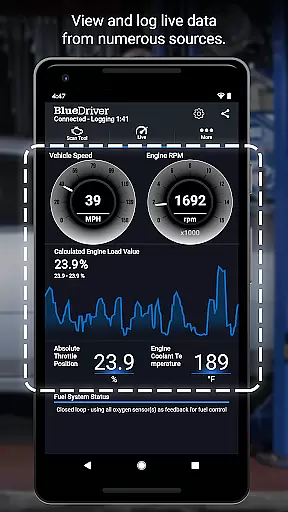
BlueDriver distinguishes itself through several innovative features that enhance the vehicle diagnostic experience. The app provides complete wireless functionality through Bluetooth connectivity, eliminating cumbersome cables while delivering real-time data and interactive graphing capabilities across multiple parameters (PIDs).
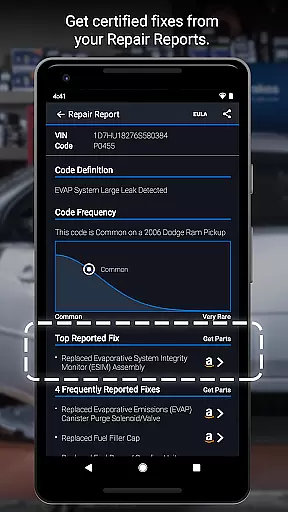
One of its most valuable features is the ability to generate professional-grade Repair Reports based on your vehicle's specific VIN and detected trouble codes. These reports include likely fixes explained in plain language, making complex automotive issues understandable for non-professionals. The app also offers enhanced diagnostics coverage for various manufacturers, including GM, Ford, Toyota, and European brands, with specific model-year support.
Additional notable features include Mode 6 test result access, metric/imperial unit selection, freeze frame data capture, and a database of millions of real-world fixes. The combination of these features creates a comprehensive diagnostic solution that works globally without requiring subscriptions or additional fees beyond the initial hardware purchase.
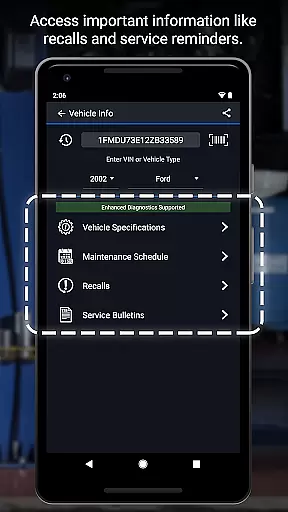
Accessing detailed vehicle information is crucial for effective diagnostics and repairs. BlueDriver OBD2 Scan Tool provides comprehensive data specific to your vehicle's make, model, and year.
The app reads and clears trouble codes for various systems including check engine, ABS, airbag, and transmission. It also generates professional-grade Repair Reports tailored to your exact vehicle specifications.
Users benefit from enhanced diagnostics coverage for major brands like GM, Ford, Toyota, and more. The app supports advanced features such as Mode 6 test results and live data graphing, empowering users with precise monitoring capabilities.
This level of detail ensures mechanics and DIY enthusiasts can make informed decisions, relying on accurate information to address vehicle issues efficiently.
Price transparency in automotive tools helps users understand the true cost of diagnostics. BlueDriver offers a unique advantage by providing a free app that works with the separately sold BlueDriver Sensor.
Unlike many diagnostic tools requiring subscriptions, BlueDriver operates without recurring fees. Users can preview Repair Reports by entering their VIN and trouble code, offering a clear understanding of potential costs before purchasing the sensor.
The app enables viewing live data, running smog tests, and accessing freeze frame information without hidden charges. This approach allows users to budget effectively for their automotive diagnostic needs.
By combining a free app with optional sensor purchase, BlueDriver delivers transparent pricing while maintaining professional-grade functionality for both mechanics and car enthusiasts.
User-friendly interface
Comprehensive diagnostics
No subscription required
Wireless functionality
Real-world fix database
Sensor sold separately
Limited free features
Device compatibility
Internet connection
Learning curve

Practice the drills within MotoJitsu Master Riding Program Volume 1 & 2!
 4.80
4.80
App Mirroring for Tesla Car's Browser
2.80
Listings of Tesla's with FSD - Included package
4.60
CVT diagnostics with ELM327 for Nissan-based vehicles
4.40
Launcher for use in the car
4.40
Discover new and used cars in Syria easily! Browse ads and connect with sellers.
3.70
The ExtraMile App allows you to pay for fuel from the comfort of your car!
4.70
Secure mobile payments & fuel savings at Phillips 66®, Conoco® and 76® stations
4.40
Quick and easy car diagnostics to get you the right fix.
4.70
Car Values, Research and More
4.80
Find Your Local Store or Shop Online for the Car, Truck, or SUV Parts You Need
4.70
DMV Test Pro offers all the updated FREE DMV tests online.
4.60
Find Fast EV Chargers | Charge Your Vehicle at 1,100+ Fast Car Charging Stations
4.60
Easy connect & control your cars from afar. Remote Lock & unlock car and carplay
4.60
OBD2 car scanner and diagnostics: read Check Engine, DTC, economy....
4.30
AI Powered - Automotive Mechanic Assistant
4.30
Your car is talking. Start listening.
4.30
O'Reilly Pro will streamline your parts lookup and ordering process!
3.20
Monitor specific TOYOTA parameters by adding this plugin to Torque Pro.
2.00


User Reviews