
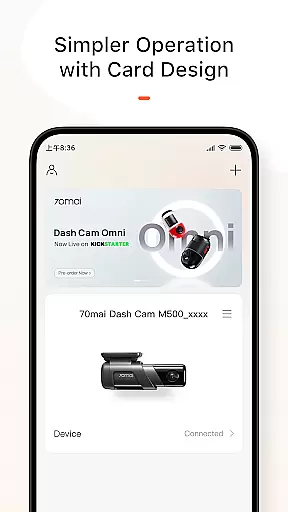
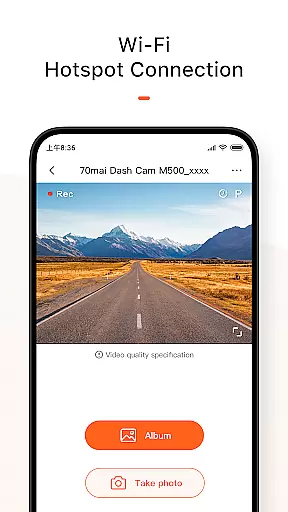
70mai App is a dedicated mobile application designed specifically for use with 70mai Smart Dash Cams. The app serves as a comprehensive management tool that allows users to connect their dash cams to their smartphones via Wi-Fi. Once connected, users can access real-time image previews directly from the dash cam, providing an immediate view of what the camera is capturing. This feature is particularly useful for adjusting camera angles or ensuring proper functionality without needing to physically interact with the device.
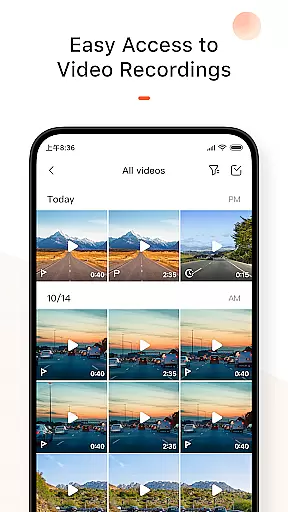
In addition to live previews, the app enables users to review historical footage and download important images or videos to their smartphones. This functionality ensures that critical moments captured by the dash cam are easily accessible and securely stored on personal devices. Furthermore, the app facilitates firmware updates by allowing users to check for available updates and download them directly to their smartphones. These updates can then be pushed to the dash cam, ensuring that the device remains up-to-date with the latest features and security enhancements.
The 70mai App is especially beneficial for drivers who want to maintain constant oversight of their vehicle's surroundings and ensure their dash cam is always operating at peak performance. By streamlining the process of managing and updating the dash cam, the app provides peace of mind and enhances the overall user experience.
One of the standout features of the 70mai App is its ability to provide real-time image previews from the connected dash cam. This functionality allows users to see exactly what the camera is capturing, which is invaluable for making adjustments or confirming the camera's field of view. The app achieves this through a seamless Wi-Fi connection that does not rely on cellular data, thus preserving the user's mobile data allowance while ensuring a stable and fast connection.
Beyond live previews, the app offers robust tools for managing recorded content. Users can effortlessly browse through historical footage captured by the dash cam and identify important events or moments. The app supports downloading these files directly to the smartphone, enabling users to store critical evidence or memorable clips securely. Additionally, the app includes a feature for managing firmware updates. Users can check for updates within the app, download the necessary files, and initiate the update process with just a few taps. This streamlined approach ensures that the dash cam remains current with the latest technological advancements and improvements.
Another notable aspect of the 70mai App is its user-friendly interface, which simplifies the entire process of interacting with the dash cam. Whether it's adjusting settings, reviewing footage, or performing updates, the app provides clear instructions and intuitive controls that make these tasks straightforward even for less tech-savvy users. Overall, the combination of real-time previews, content management, and firmware update capabilities makes the 70mai App an indispensable tool for anyone using a 70mai Smart Dash Cam.
70mai App provides comprehensive details about your vehicle's smart dash cam, ensuring you have all the necessary information at your fingertips. This includes real-time image previews directly from the dash cam, which allows users to monitor their surroundings effectively.
The app enables users to access historical footage and download crucial images or videos to their smartphones without using a SIM card. This feature ensures that important moments are always saved securely on personal devices, enhancing data accessibility and security.
Additionally, 70mai App offers firmware updates for the dash cam. Users can check for updates within the app, download the update package, and push it to the dash cam for installation. This ensures that the device remains up-to-date with the latest features and improvements, maintaining optimal performance.
While 70mai App itself is free to use, it enhances price transparency by providing clear information on potential costs associated with the smart dash cam. For instance, users can see if there are any optional accessories or services available for purchase directly through the app.
The app also eliminates hidden fees by allowing users to download important content without incurring data charges. Since the connection between the dash cam and the phone does not require a SIM card, users avoid unexpected expenses related to data usage.
Furthermore, 70mai App ensures that firmware updates are delivered seamlessly, preventing any additional costs that might arise from outdated software. By keeping the dash cam updated, users can enjoy uninterrupted service without worrying about extra charges for maintaining their device.
User-friendly interface
Real-time camera preview
Efficient firmware updates
Secure content storage
Comprehensive footage management
Limited to 70mai devices
Wi-Fi connection required
No cloud backup option
Occasional connectivity issues
Firmware update dependency

Read and delete OBD codes with any ELM327 OBD scanner. Coding functions included
 3.40
3.40
Oil change service & coupons for car maintenance at Valvoline Instant Oil Change
4.70
Instant diesel savings. No credit checks or fees. Nationwide growing network.
4.40
View your car’s service records and find out when maintenance is due.
4.70
DMV practice test 2025: Driver License permit test & written test for all states
4.70
Find, search, and browse 40,000+ used cars, SUVs, and trucks.
4.50
7-Day Returns on All Cars
4.80
Earn and save with Fuel Rewards®
3.20
Autotrader is your online solution for buying and selling new and used cars.
4.40
Take Control of Your Car
4.80
Shop cars & see your financing
4.60
CVT diagnostics with ELM327 for Nissan-based vehicles
4.40
Automotive Electrical Wiring Diagrams
4.40
AI Powered - Automotive Mechanic Assistant
4.30
Monitor your behind-the-wheel behavior to become a safer driver and save.
4.10
OBD diagnostics, Live Data, DPF regeneration for BMW
4.00
Club Car Wash Mobile App—the fast lane to managing your wash membership.
3.30
Easily notify car owners in urgent situations, safe, fast, multilingual.
4.3
Ferrari inspired analog & digital watch face with quick access and premium style
4.4


User Reviews