

Transparent Clock & Weather Pro is a comprehensive weather application that provides accurate local and worldwide weather forecasts. The app delivers live weather updates, hourly and daily forecasts, and timely weather alerts to keep users informed and prepared for changing conditions. With features like 24x7 weather forecasts, severe weather alerts, and radar maps, this app ensures you have the latest weather information at your fingertips.
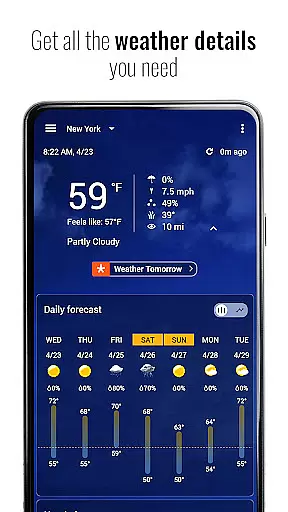
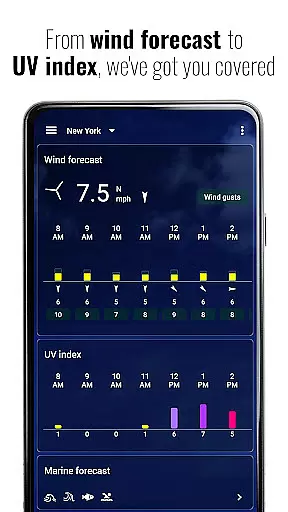
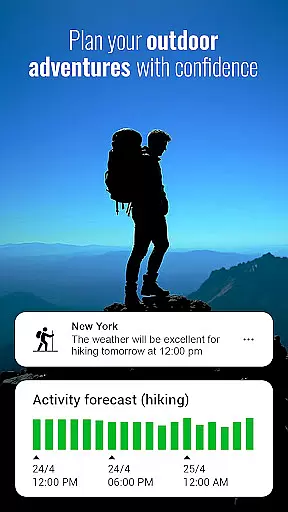
The app goes beyond basic forecasting by offering detailed insights into rain and snow predictions, 'feels like' temperatures, air quality index (AQI), UV index, humidity, visibility, wind direction, wind speed, and pressure changes. Its unique Activities feature helps outdoor enthusiasts plan their adventures by providing weather suitability for activities such as hiking, running, camping, kayaking, fishing, and hunting up to 48 hours in advance.
Transparent Clock & Weather Pro also includes customizable widgets, sun and moon tracking, and premium features available through subscription. These include extended temperature notifications, animated doppler weather radar, hurricane and storm tracker, and access to premium weather icons and backgrounds. Whether you need current conditions or long-term forecasts, this app serves as your daily companion for all weather-related information.
One of the standout features of Transparent Clock & Weather Pro is its robust set of tools designed to provide users with detailed and actionable weather data. The app offers 24x7 weather forecasts, allowing users to check the latest weather conditions at any time, from anywhere. This includes everything from hourly updates to 15-day forecasts, ensuring comprehensive coverage no matter where you are located.
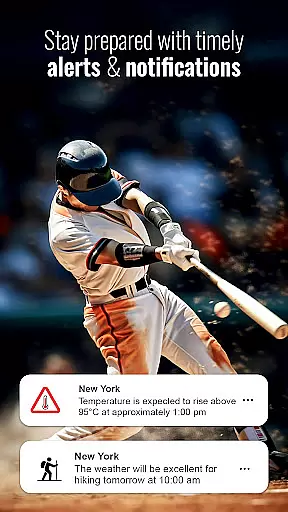
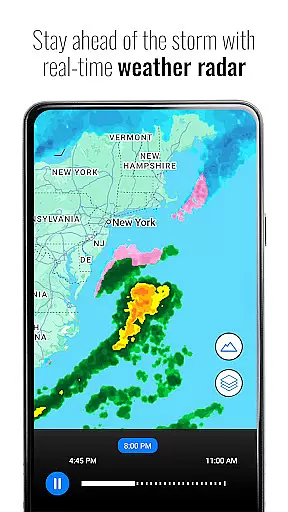
In addition to standard forecasts, the app provides severe weather alerts that notify users of potential hazards such as high or low temperatures, strong winds, and other adverse conditions. Users can track hazardous weather using radar maps that offer real-time data on rainfall, temperature, and other critical metrics. The inclusion of an hour-by-hour activity forecast makes it particularly useful for planning outdoor activities, giving insights into weather suitability for various pursuits over the next 48 hours.
Customization is another key aspect of this app, with options ranging from beautiful home screen widgets to dynamic displays of sunrise and sunset times. Premium subscribers gain access to advanced features like animated doppler weather radar, hurricane and storm tracking, and detailed air quality information. These functionalities not only enhance user experience but also ensure that individuals stay prepared and informed about impending weather events.
Transparent clock weather Pro delivers highly accurate weather forecasts and credible data, ensuring users can rely on the information for planning their daily activities. The app sources its data from reputable meteorological services, providing real-time updates and detailed predictions that cover both local and global locations.
The app's forecasting spans from an hourly to a 15-day outlook, including critical parameters such as temperature, precipitation, wind speed, and air quality index (AQI). This comprehensive approach allows users to prepare adequately for any weather condition they might encounter.
Users benefit from timely alerts about severe weather conditions, empowering them to make informed decisions regarding travel, outdoor activities, and safety measures. With precise 'feels like' temperatures and UV index readings, individuals can better manage their exposure to the elements.
One of Transparent clock weather Pro's standout features is its extensive temporal and spatial forecast range, offering detailed insights into upcoming weather patterns across different geographical areas. Whether you need an hour-by-hour breakdown or a long-term forecast spanning up to 15 days, this app has got you covered.
The spatial coverage extends worldwide, making it an invaluable tool for travelers and those who require frequent updates on international weather conditions. By integrating advanced radar maps and satellite imagery, the app provides a dynamic view of weather systems as they develop and move.
This functionality proves particularly useful when tracking storms or other significant weather events. Users receive early warnings and detailed progress reports, allowing them to stay ahead of potentially hazardous situations. Such robust forecasting capabilities ensure that Transparent clock weather Pro remains a trusted companion for all your weather-related needs.
User-friendly interface
Accurate weather forecasts
Comprehensive alert system
Customizable widgets
Detailed radar maps
Premium features require subscription
Some features may be overwhelming
Limited free content
Occasional update bugs
High resource usage

Get accurate rainfall and snowfall totals for pinpoint locations on a map.
 4.60
4.60
Quickly check the Hanalei river gauge height during heavy rains on Kaua'i.
4.4
Global weather forecast, powered by layered radar & hourly weather updates
4.10
Industry leading whitetail movement predictor & hunting app.
4.60
Stay ahead of the weather with Daily Weather
4.10
Digital Weather Watch Face for Wear OS 5+
4.5
Powerful US and worldwide earthquake feed with earthquake alerts and maps.
4.70
Weather radar map, storm tracker, local forecast, live rain alerts & daily news.
4.60
Your ultimate app for real-time weather information!
4.70
Live Weather Forecast app with acu weather radar, weather alert & weather widget
4.80
Hourly and daily weather forecast, current condition, temperature, UV and more!
4.70
Weather radar, satellite, wind, waves, ocean and hurricane forecasts.
4.70
The weather channel, tiempo weather forecast, weather radar & weather map
4.70
Weather channel forecasts weather daily & hourly, local and national air quality
4.70
Your ultimate app for accurate local weather information!
4.60
Get the ad-free version of the highly rated WeatherBug app for accurate weather!
4.50
Weather watch face for Wear OS 5
4.40
Weather forecast & live radar map
4.20
Live NOAA weather app to track storm, rain, wind, lightning & real local updates
4.20


User Reviews