
Flow Weather is a comprehensive weather application designed to be your personal weather assistant. It provides accurate real-time weather data, including temperature, humidity, wind speed, and air quality for your location. The app stands out with its multi-dimensional forecasting capabilities, offering both hourly and long-term weather predictions.
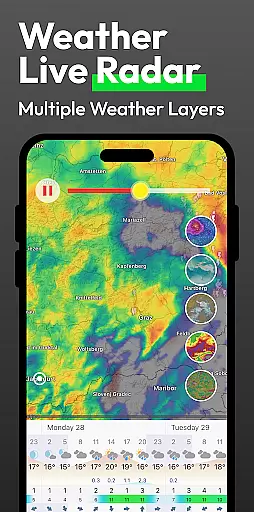
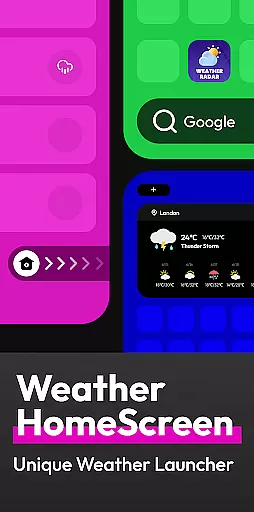
In addition to basic weather information, Flow Weather offers advanced features such as severe weather alerts and interactive weather layers. These layers allow users to explore various meteorological phenomena like wind patterns, cloud coverage, and UV indexes. The app also innovates with an Android launcher that integrates weather updates directly onto the smartphone's home screen, allowing quick access to weather information with a simple swipe.
This app is ideal for individuals who need reliable weather forecasts to plan their daily activities effectively. Whether you're scheduling outdoor events or preparing for potential weather disruptions, Flow Weather ensures you stay informed and prepared.
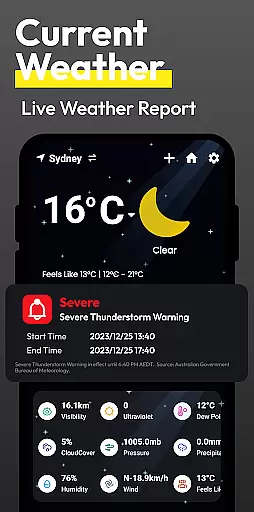
Flow Weather boasts several distinctive features that cater to diverse user needs. Its reliance on advanced meteorological services ensures precise real-time weather reporting. Users can view detailed weather metrics such as temperature, humidity, wind conditions, and air quality at a glance.
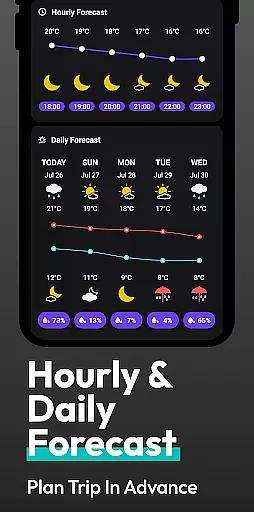
The app's forecasting functionality is particularly robust, providing both short-term hourly updates and extended outlooks spanning multiple days. This allows users to plan both immediate and future activities with confidence. Additionally, Flow Weather includes a weather warning system that alerts users to adverse conditions like heavy rain, snowstorms, or heatwaves, ensuring they can take preventive actions.
For those requiring more in-depth analysis, the app offers interactive weather layers. These layers cover various aspects such as wind, clouds, waves, UV, and PM2.5 levels, enabling users to gain deeper insights into atmospheric conditions. Furthermore, the innovative Android launcher integration simplifies access to weather updates, enhancing user convenience by embedding this essential information directly into the smartphone interface.
Forecast accuracy and data credibility are essential for any weather application, and Flow Weather excels in these areas. By partnering with advanced meteorological services, the app delivers precise real-time weather information to its users. This includes detailed indicators such as temperature, humidity, wind speed and direction, air pressure, and air quality, ensuring that you have a comprehensive understanding of your current weather conditions.
Flow Weather doesn't stop at providing just the present conditions; it extends its accuracy to future weather forecasting. With multi-dimensional forecast functions, users receive hourly updates on upcoming weather changes and trends spanning several days. This empowers individuals to plan their schedules and activities with confidence, knowing they can rely on the app's predictions.
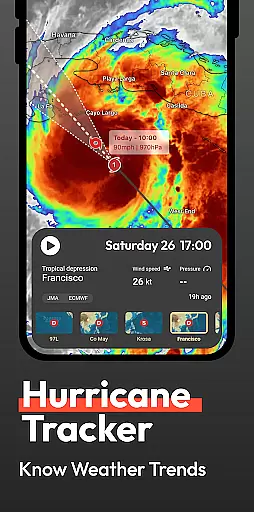
In addition to regular forecasts, Flow Weather offers timely weather warnings. Whether facing heavy rain, blizzards, high temperatures, or cold waves, users get alerts that help them prepare in advance. Such features ensure that severe weather doesn't catch you off guard, enhancing both convenience and safety.
The temporal and spatial forecast range is another critical aspect where Flow Weather shines. The app provides extensive coverage over various geographical locations, ensuring that no matter where you are, you'll receive accurate and localized weather forecasts. Its ability to deliver reliable data across different regions makes it an indispensable tool for travelers and locals alike.
Moreover, Flow Weather supports its wide-reaching forecasts with interactive weather layers. These layers allow users to explore multiple dimensions of the weather system, including wind conditions, cloud movements, wave patterns, UV indexes, and PM2.5 levels. Such depth not only caters to everyday users but also satisfies those who require professional-level insights into meteorological phenomena.
By integrating innovative interaction features based on the Android launcher, Flow Weather simplifies access to this wealth of information. Users benefit from a personalized weather experience right on their mobile home screen, allowing quick checks and efficient management of daily tasks. This seamless blend of functionality and accessibility underscores the appu2019s commitment to delivering a superior user experience.
User-friendly interface
Accurate weather data
Comprehensive forecasting
Interactive weather layers
Integrated Android launcher
Permission required for location
Limited customization options
Occasional data delays
Advanced features may overwhelm new users
Some features locked behind premium version

Weather for Indiana, Kentucky and Ohio
 4.90
4.90
Thermometer shows indoor and outdoor temperature
4.70
The Weather Network TV App - Your weather when it really matters
2.90
Weather - Local weather forecast, weather daily & hourly, weather radar
4.80
Instant weather updates, easy to check anytime on your home screen.
3.50
Digital Weather Watch Face for Wear OS 5+
4.2
NOAA forecast & radar for your exact location.
4.80
Your Reliable Weather Companion
4.10
Weather Forecast, Trending News, Hurricane & Storm Tracker, Alerts & Live Radar.
4.80
No ads, No data collected. Beautiful and powerfully customizable weather app
4.90
weather forecast, weather radar, weather widget in one local weather app
4.70
Industry leading whitetail movement predictor & hunting app.
4.60
72-hour weather & daily forecasts with extreme weather alerts
4.60
The most accurate weather app, hourly and daily weather, severe weather alerts
4.50
Accurate weather forecast and beautiful weather & clock widgets
4.20
Live NOAA weather app to track storm, rain, wind, lightning & real local updates
4.20
Advanced weather toolkit, providing detailed weather information for any season!
3.50
Determine Best Hunting Times for any date, any location.
2.50
Quickly check the Hanalei river gauge height during heavy rains on Kaua'i.
4.3


User Reviews