
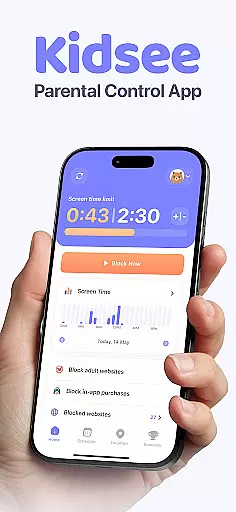
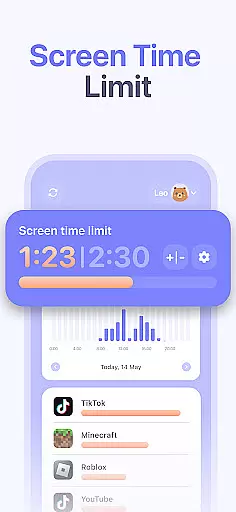
Kidsee Parental Control is a comprehensive family safety solution designed to help parents manage their children's screen time, app usage, and online safety. The app offers flexible controls that allow parents to set daily time limits, block specific apps or categories, and create custom schedules for different occasions like school days or weekends.
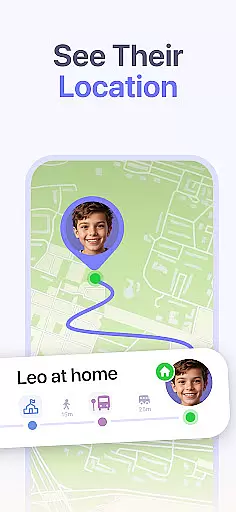
In addition to screen time management, Kidsee provides real-time GPS tracking and location history, giving parents peace of mind about their child's whereabouts. Parents can also monitor phone battery levels to maintain connection and track app usage patterns. With support for both Android and iOS devices, this parental control tool ensures a safer digital environment while promoting healthy technology habits.
Parents managing multiple children will appreciate the ability to oversee up to 10 devices from a single account. The app's all-in-one approach helps prevent phone addiction, supports better focus for kids, and gives families confidence in their digital safety measures.
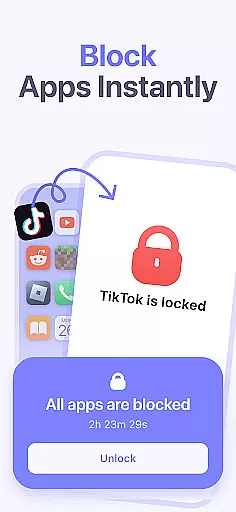
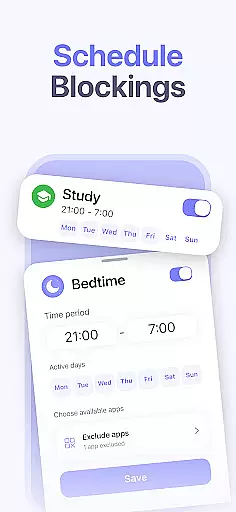
Kidsee stands out with its robust feature set tailored for modern parenting challenges. The app's instant app blocking function lets parents remotely lock distracting applications on their child's device when necessary. Its customizable scheduling system allows setting specific time restrictions by day of the week, accommodating various routines including school hours and bedtime.
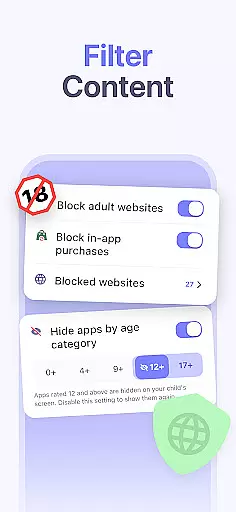
The GPS tracking functionality provides accurate real-time location data while maintaining privacy standards. Parents can review location history and monitor battery levels to ensure continuous connection. Kidsee's content filtering capabilities automatically block adult websites and enable manual addition of restricted sites, creating a safer browsing experience.
Additional features include blocking in-app purchases to prevent accidental spending, supporting multiple child accounts from one parent dashboard, and working seamlessly across different device types. These comprehensive tools work together to create a protective yet flexible digital environment for growing families.
When it comes to parenting apps, the credibility of the content and validation by experts is paramount. Kidsee Parental Control App ensures that all features are designed with the guidance of child psychologists and digital safety experts. This guarantees that the app not only helps in managing screen time but also promotes healthy digital habits among children.
The app's ability to block adult content and manage in-app purchases is developed based on extensive research into online child safety. By setting up a secure environment, Kidsee allows parents to rest assured that their children are protected from inappropriate content and unexpected charges while using their devices.
Furthermore, Kidsee's approach to promoting digital wellbeing is backed by evidence-based practices. The app provides parents with tools to monitor and guide their children's device usage effectively, ensuring a balanced lifestyle. With these expert-validated features, Kidsee stands out as a reliable partner for modern families navigating the digital world.
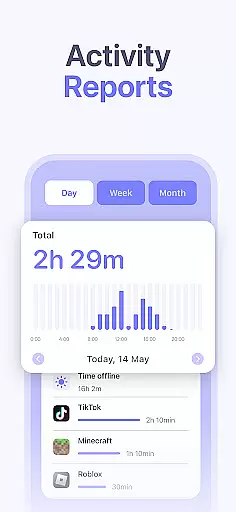
Growth tracking in the context of a parental control app refers to the precision with which an app can monitor a child's development through their digital activity. Kidsee offers accurate tracking of app usage and screen time, giving parents insights into their children's digital habits. This data is crucial for understanding how children interact with technology and where adjustments may be needed.
With Kidsee, parents can set daily limits and schedules for device use, ensuring that screen time does not interfere with educational activities or sleep patterns. The app's reporting tools allow for detailed analysis of when and how long a child uses specific apps, enabling parents to tailor restrictions that promote healthier habits.
Moreover, Kidsee's GPS tracking feature adds another layer of accuracy to growth monitoring by providing location history. Parents can correlate this information with digital activity reports to gain a comprehensive view of their child's routine. Such precise tracking empowers parents to make informed decisions about their child's digital and physical wellbeing.
Comprehensive parental controls
Real-time GPS tracking
Multi-device management
Flexible scheduling options
Automatic content filtering
Paid subscription required
Setup process complex
Limited iOS functionality
Regular updates needed
Internet connection mandatory

GPS phone tracker: find kids on map. Location tracking and parental control.
 4.50
4.50
The Baby’s Bounty App is your hub to register for our diaper banks in Nevada
3.70
Little loved one's monitoring, Sleep tracking and Parenting content.
3.80
A Coloring for the Whole Family! Discover the Joy of Family Love Through Colors!
3.60
Magic chalkboard coloring and drawing!
4.20
Family parental control app: limit screen time, block apps, GPS tracker.
4.20
Live Location, Alerts & 2-Way Voice for Kids and Adults with Special Needs
4.60
Advanced baby tracking, expert sleep help & parenting support for every stage.
4.80
FamilyAlbum helps you share, save, and remember your child's special moments.
4.80
Daily Routine & Timer for kids, ADHD, & Autism
4.80
Track Pregnancy, Baby Feeding, Sleep, Diaper Changes, Postpartum Health & More!
4.80
Sleep better with white noise app! Discover rain sounds, fan noise and more.
4.70
It is a screen time management tool for games and mobile applications
4.50
Speech Therapy Exercises For All!
4.40
Comprehensive Parental Control & Child Safety — Hear & Protect Your Child World
4.30
Fake call application designed for parents and adults to discipline their children through the children's police.
4.20
Pregnancy and baby formula tips for moms, plus Enfamil coupons & cash back
4.10
Keep Your Family Safe with Pollog Family Assistants
4.10
Save money on diapers. Get the Pampers Rewards app.
3.90


User Reviews