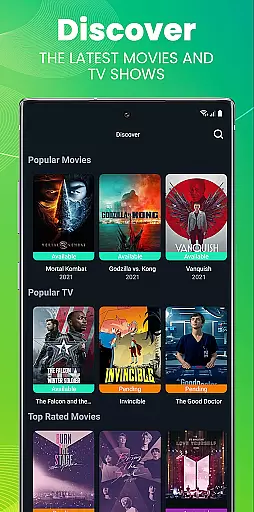
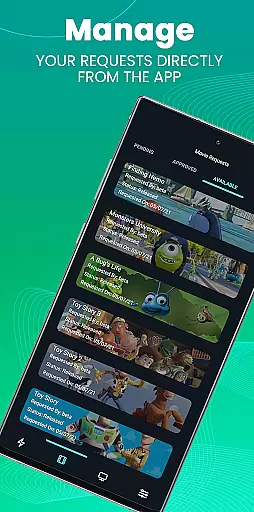
Ombi is a self-hosted entertainment management app that revolutionizes content discovery and request management for Plex, Emby, and Jellyfin users. This innovative application enables shared users to independently request movies and TV shows, streamlining the content acquisition process.
The app's integration with multiple DVR tools creates a seamless experience from request to playback. With its QR code authentication system and evolving feature set, Ombi represents a significant advancement in home entertainment management, particularly for those running their own media servers.
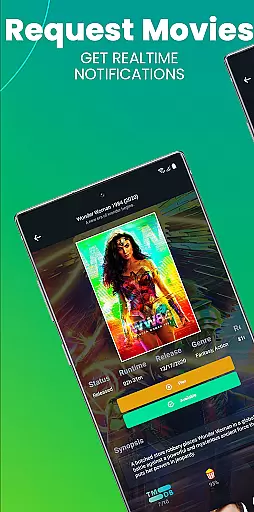
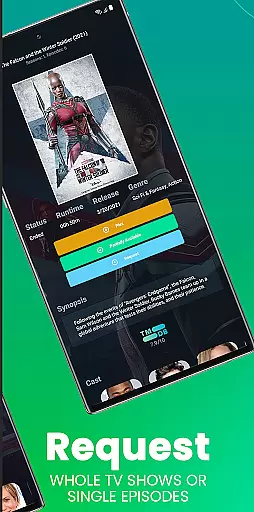
Ombi distinguishes itself through several key features that enhance entertainment management. The app's core functionality allows users to submit content requests directly from their mobile devices, eliminating the need for manual coordination with server administrators.
A notable advantage is its compatibility with various media servers and DVR tools, creating an integrated ecosystem for content management. The implementation of QR code-based authentication ensures secure access while maintaining ease of use. As a self-hosted solution, Ombi provides administrators with complete control over their entertainment infrastructure.
Ombi offers a diverse range of content options by integrating with Plex, Emby, and Jellyfin, allowing users to request TV shows and movies directly through the platform. This self-hosted web application ensures that users have access to the latest media by connecting with multiple DVR tools, streamlining the content acquisition process for an optimal entertainment experience.
The app's seamless integration with various media libraries guarantees that users can find and request their favorite shows and films without hassle. By supporting automatic updates and synchronization with the Ombi server, the application consistently provides up-to-date content suggestions, ensuring that users never miss out on new releases or popular titles.
Moreover, Ombi's ability to link with different DVR systems enhances its functionality, providing a comprehensive solution for managing media requests. This feature not only increases user engagement but also simplifies the process of obtaining desired content, making it an invaluable tool for entertainment enthusiasts looking to expand their media collection.
Ombi is designed to keep users engaged with its intuitive interface and seamless integration capabilities, encouraging longer interaction times as users explore and request content. The platform's ability to connect with existing media servers like Plex and Emby means that users can easily manage their entertainment libraries, leading to increased time spent within the app as they discover new content to enjoy.
Retention is further enhanced by Ombi's continuous evolution and regular updates, which introduce new features and improve the overall user experience. As the app develops, it promises to offer even more functionality, ensuring that users remain interested and invested in using Ombi for their entertainment needs.
Additionally, the requirement for users to log in and scan a QR code to access the mobile version of Ombi fosters a sense of personal ownership and connection to the platform. This personalized approach not only strengthens user engagement but also promotes loyalty, as individuals are more likely to continue using a service that they feel is tailored specifically to them.
User-friendly interface
Seamless server integration
Secure authentication system
Regular feature updates
Comprehensive media support
Requires existing account
Server version limitations
Complex initial setup
Limited official support
Dependent on third-party services

Ultimate VR movie player for android mobile videos
 4.3
4.3
Watch whatever you want, whenever you want, wherever you want.
3.30
Time tracking, lap counting and much more for Carrera® Digital 132/124
4.80
SpiritWave is paranormal ITC application.
5.00
Fool your friends & Family with Fake ultrasound test report
3.60
The JBL Portable app works with JBL portable Bluetooth speakers.
4.60
Control your AWTRIX 3 easily
4.5
The classic game of rock, paper, scissors
4.1
Earn big rewards like PayPal & Amazon gift cards by playing games you love!
4.30
Colorful flows will relax and calm you down, or get you trippy and creative!
4.90
Classic dynamic pixel art from Mark Ferrari.
4.70
Watch short films, dramas, reels, series and movies anytime on Micro Drama.
4.60
Premium version to enjoy your favorite anime
4.60
Create and play realistic-looking mock Emergency Alert System messages.
4.30
Best of icon for christmas
4.30
Watch New Episodes & Live TV
3.80
Your choice of 350+ networks plus movies and full TV series on-demand.
3.70
Christmas Globe: Transform your Wear OS device into a festive timekeeper!
4.0
See the frequencies! Watch the magic!
4.2


User Reviews