



Howbout is a leading social calendar application designed specifically for friends who want to stay connected in a fun and organized way. This app redefines traditional calendars by integrating social features that make planning and sharing activities seamless. With millions of users already on board, Howbout has gained recognition from major platforms like Apple, Business Insider, and TechCrunch.
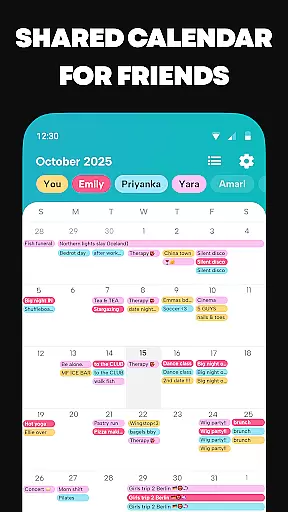
The app offers an intuitive shared calendar system where users can easily manage group events, color-code activities, and share availability with friends. Beyond basic scheduling, it includes creative tools such as adding header pictures or GIFs to events, setting reminders, and even syncing external calendars. Whether you're organizing a casual hangout or tracking multiple schedules, Howbout ensures everything stays coordinated while keeping the experience enjoyable.
One standout feature is its ability to integrate various aspects of your life into one place—syncing work, school, or personal calendars alongside your social plans. The inclusion of customizable privacy settings, built-in chats, and interactive elements like reactions makes this app not just functional but also engaging. For anyone looking to enhance their social planning without sacrificing personality, Howbout delivers both utility and flair.
Howbout stands out through its comprehensive set of innovative features tailored for modern social interactions. At its core, the app provides a shared calendar functionality that allows users to effortlessly organize group events and track each other's availability. Each event can be customized with colors, notes, descriptions, locations, and even fun visuals like GIFs, making every plan visually distinct and easy to identify at a glance.
Beyond scheduling, Howbout incorporates advanced tools such as poll creation, countdown timers, and reminder alerts, ensuring no detail is overlooked when coordinating plans. Users can sync their existing calendars from platforms like Google Calendar, Apple Calendar, or Outlook, creating a unified view of all commitments. Additionally, the app supports widgets, enabling quick access to daily schedules directly from the home screen.
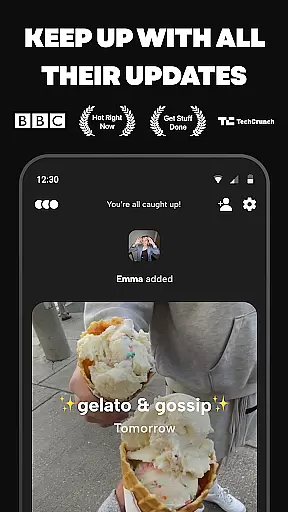
Social connectivity is further enhanced through integrated chat functionalities, including group chats for every event and direct messaging options. Privacy controls allow users to decide who sees specific events or groups, while a dedicated activity feed lets them stay updated on friends' latest plans. These thoughtful additions transform a simple calendar tool into a dynamic platform for maintaining meaningful connections.
User profile customization is a crucial aspect of any social application, allowing users to express their individuality and establish their digital identity. Howbout excels in this area by providing a comprehensive suite of personalization options.
With Howbout, users can add a profile picture, choose colors that reflect their personality, and set up their calendar with elements that resonate with their unique traits. This level of customization ensures that each user's profile is not only visually distinctive but also truly representative of their personal brand.
Authenticity verification is equally important in fostering trust within the community. While specific details on Howbout's verification process are not provided, the app likely employs measures to confirm the legitimacy of profiles, thus enhancing the reliability of interactions among friends.
The combination of extensive customization features and potential authenticity checks creates an engaging and trustworthy environment where users feel confident in expressing themselves and connecting with others.
Connection discovery is a fundamental feature for social apps, enabling users to find and connect with friends easily. Howbout offers intuitive tools designed to facilitate this process seamlessly.
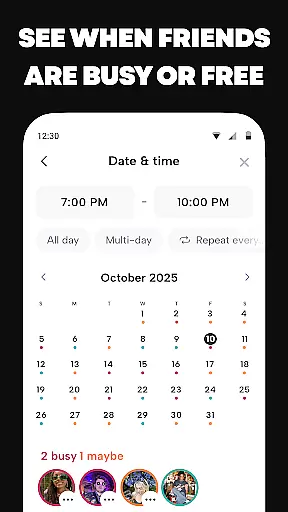
Through its shared calendar functionality, users can effortlessly share their schedules and view friends' availability, making it simple to identify mutual free times and plan gatherings. The app's design encourages active participation in a friend-focused activity feed, which allows users to stay updated on their friends' latest plans and updates.
In addition to these features, Howbout supports various forms of interaction, such as group chats and direct messages, consolidating communication and planning in one convenient location. These integrated communication channels further enhance the connection discovery experience.
By combining practical scheduling tools with dynamic social features, Howbout creates numerous opportunities for users to discover and nurture meaningful connections with their friends.
User-friendly interface
Highly customizable events
Integrated chat functionality
Syncs with external calendars
Vibrant community engagement
Limited offline functionality
Premium features require subscription
Occasional notification delays
Steep learning curve for new users
Heavy reliance on internet connection

Watch, Edit, Upload and Share Gaming Clips
 4.00
4.00
Get your NGL Link
4.60
Dating for singles. Meet lonely people nearby online. Find your match here!
4.20
Watch super live shows 24/7, chat & meet friends in Plamfy social networking app
4.70
Random chat & meet online. Find your soulmate or someone special and have fun!
3.90
SuperLive is a super popular video-streaming social network
4.60
This version of Facebook uses less data and works in all network conditions.
4.60
Reddit is where you’ll find your people and feel at home in every conversation.
4.60
Join your friends and discover videos you love, only on TikTok
4.10
Live pics from your friends - Only the photos you want to see
4.60
Unlimited calls & texts | WiFi voice line plus group txt | Call & text now
4.50
Live video chat to connect with people around the world. Video chatting on Olive
4.40
Watch 24/7 live stream, and make real friends nearby
4.30
Looking for a date or a friend? Swipe to match and meet open-minded singles.
4.20
Second phone number for phone calls & texts. Text & SMS me now with a 2nd number
4.20
Create your personal AI chatbot: talk, roleplay, and connect with characters!
4.10
Meet online & chat with people! Talk, have fun, make connections in real time!
4.00
Instant video chat with cool people. Live video call & make friends with Monkey!
3.80
Video call, live video chat & talk to strangers. Meet people on Omega!
3.60


User Reviews