
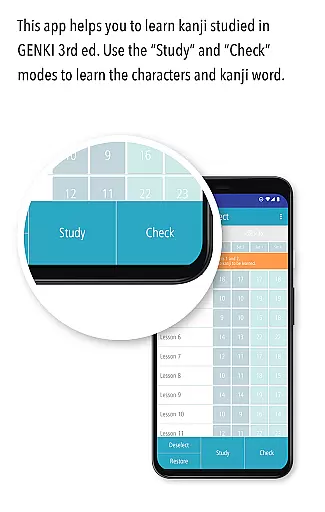
GENKI Kanji for 3rd Ed. is an educational app designed to help users learn and recognize 317 basic kanji characters through over 1,100 kanji words. Developed as part of the best-selling GENKI series of Japanese learning materials, this app offers a structured yet flexible approach to mastering essential kanji. It features three main modes: Study, Check, and List, each crafted to enhance different aspects of the learning process.
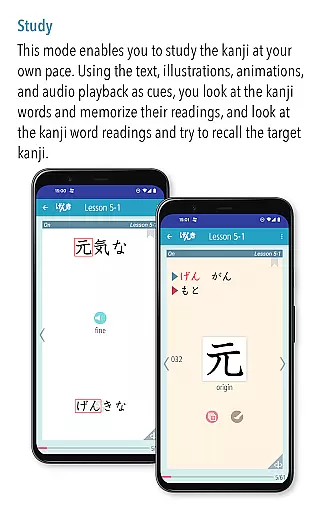
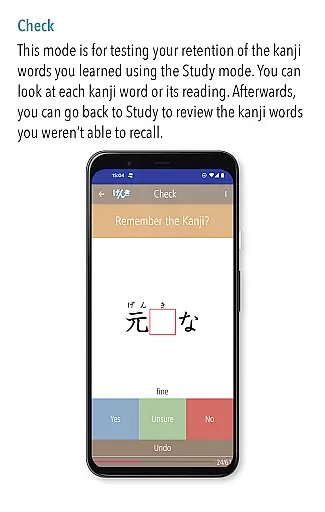
The Study mode allows learners to view kanji words alongside their readings and stroke order animations, supported by mnemonic illustrations. The Check mode enables self-assessment, helping users track their progress by sorting mastered words from those still needing practice. Finally, the List mode provides organized displays of all words and kanji, allowing users to monitor their advancement and review efficiently. This app is ideal for students using the third edition of the GENKI textbook series.
GENKI Kanji for 3rd Ed. stands out with its comprehensive study tools tailored for effective kanji learning. One key feature is the audio support provided for each kanji word, offering natural pronunciations by native speakers. This auditory reinforcement aids in better retention and understanding of the language.
Another notable aspect is the app's efficient learning system, which progressively removes mastered kanji words from the study set. This ensures that users can focus on challenging content, optimizing their study time. Additionally, the app includes mnemonic hints and fun illustrations derived from the popular "Kanji Look and Learn" resource, making the learning process engaging and memorable.
With functionalities like bookmarking for personalized review lists and multiple sorting options (lesson order, a-i-u-e-o order, alphabetical), learners have complete control over their study sessions. These features collectively create an immersive and productive environment for mastering basic kanji.
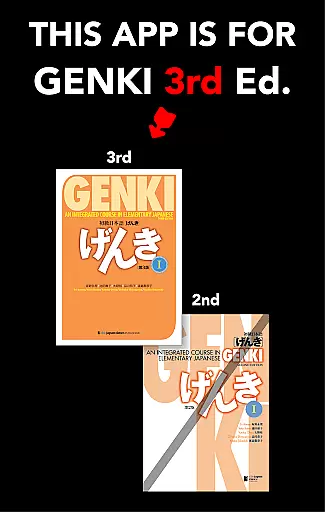
GENKI Kanji for 3rd Ed. ensures content accuracy by providing over 1,100 kanji words aligned with the third edition of GENKI: An Integrated Course in Elementary Japanese. This best-selling series has sold more than 2.5 million copies, establishing its authority in Japanese language education.
The app includes audio recordings of natural pronunciations by native speakers for all kanji words, reinforcing correct learning. Each kanji is accompanied by basic information, fun illustrations, mnemonic hints, and animations of stroke order sourced from the popular learning resource 'Kanji Look and Learn.'
Users can bookmark challenging kanji words, which are compiled into a Bookmark list, allowing focused study on difficult areas. The app progressively removes mastered kanji from the study set, ensuring efficient learning and retention.
GENKI Kanji for 3rd Ed. offers personalized learning paths through its three main modes: Study, Check, and List. These modes allow users to learn at their own pace, track their mastery, and review their progress efficiently.
In the Study mode, users can view kanji words, their readings, and target kanji repeatedly. The Check mode helps learners sort kanji words into mastered and unmastered categories, focusing their efforts on challenging kanji.
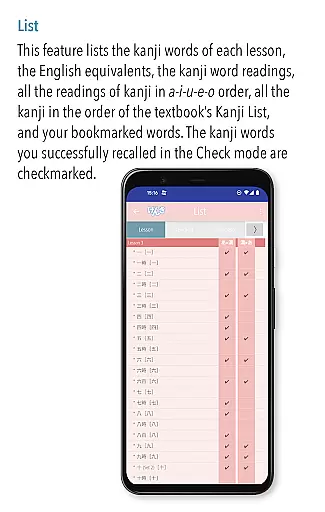
The List mode displays various lists such as lesson order, a-i-u-e-o order, or alphabetical order, with automatic checkmarks for mastered words. Users can search and review kanji words quickly, making the learning process both flexible and personalized.
User-friendly interface
Audio pronunciation guides
Customizable study sets
Progress tracking tools
Engaging illustrations
OS10 or higher required
No second edition support
Device compatibility issues
Limited to basic kanji
Premium price tag

Grazing Risk Monitoring Service
 4.5
4.5
Explore myths and gods across cultures with in-depth insights and stories.
5.00
Break Language Barriers with AI—Learn Language Anytime, Anywhere!
4.00
Age-Related Child Developmental Milestones
4.80
A must-have app for mastering Japanese verb/adjective conjugations.
3.60
Intuitive Transformer Lab - By a Lineman, For Linemen & Apprentices
4.50
Stack the Countries makes learning world geography fun!
4.50
Adventures await with Spider-Man and other Marvel characters!
4.10
Fun, personalized math learning games that adapt to your child’s needs.
4.40
Hebrew Vocab
4.90
Experience the sky, planet earth and the solar system like never before
4.90
A realistic sky map to observe stars, planets, satellites and constellations!
4.80
Learning the ancient Viking language made simple
4.70
Perform physics experiments with your phone. (by the RWTH Aachen University)
4.70
The Only Official DVSA Theory Test Kit App
4.50
Pass your FAA written with flying colors - Study Buddy can help.
4.30
Designed for Calculator 84 users
4.20
An aviator’s preparation, study and test tool for FAA Knowledge Exams.
4.00
An animated storybook app to help ease your child through toilet training.
3.70


User Reviews