
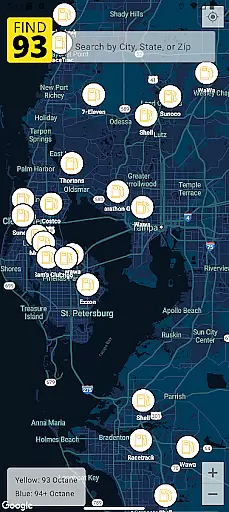
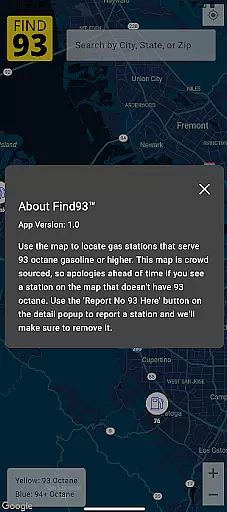

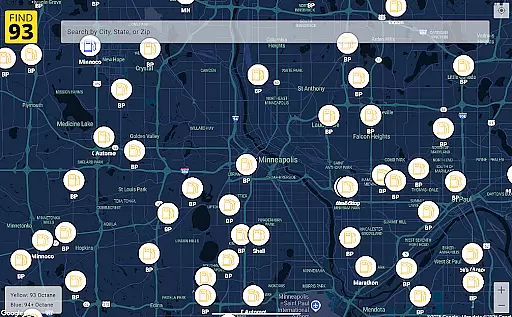
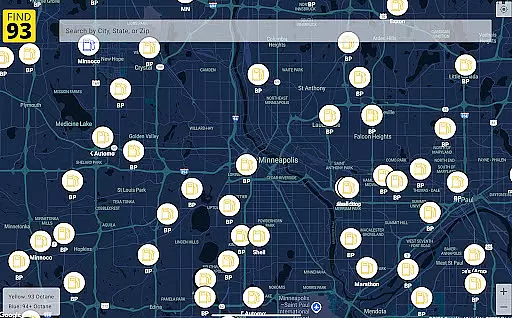
Find93 is a specialized navigation app designed to help drivers locate gas stations that offer 93 octane gasoline or higher. The app's core functionality revolves around its crowdsourced map system, which provides real-time information about fuel stations. Users can easily find nearby stations and access detailed information including location, fuel types, and additional descriptions.
The app stands out with its integrated navigation feature that works seamlessly with major mapping services like Apple Maps, Google Maps, and Waze. Whether you're on a long road trip or need premium fuel in an unfamiliar area, Find93 ensures you can always find the right station. Its community-driven approach allows users to report stations that no longer carry 93 octane fuel, keeping the database current and reliable.
This application is particularly valuable for owners of high-performance vehicles that require premium fuel. By providing accurate station information and easy navigation options, Find93 saves both time and fuel costs while ensuring your vehicle gets the quality fuel it needs.
Find93 offers several distinctive features that make it an essential tool for drivers seeking premium fuel. The app's primary feature is its comprehensive crowdsourced map, which displays gas stations carrying 93 octane or higher-grade fuel. This map is constantly updated through user contributions, ensuring the information remains current and accurate.
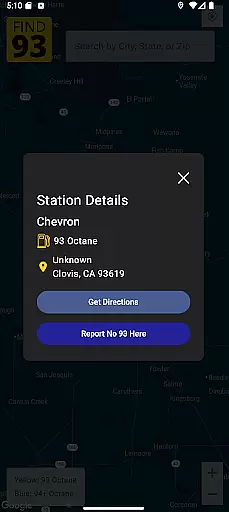
A key innovation is the station reporting system. Users can flag stations that no longer offer 93 octane fuel by simply tapping the 'Report No 93 Here' button. This feature maintains data integrity and helps other users avoid unnecessary trips. Additionally, each station listing includes detailed information such as address, fuel types, and supplementary descriptions, helping users make informed decisions.
The app's navigation integration sets it apart from standard mapping applications. Users can choose their preferred navigation service - Apple Maps, Google Maps, or Waze - directly from the station details page. This flexibility in navigation options, combined with the app's clean and intuitive interface, creates a seamless user experience that simplifies finding and reaching suitable gas stations.
Map accuracy is essential for any navigation app, and Find93 excels in this area by providing users with the most up-to-date information on gas stations that serve 93 octane or higher. This crowdsourced map relies on user contributions to ensure that drivers have access to current data.
The app's community-driven approach means that users can report stations not serving 93 octane fuel anymore, which keeps the map reliable and precise. With just a tap on the 'Report No 93 Here' button, users help maintain the integrity of the map, ensuring every driver makes informed decisions based on accurate station details.
Find93 provides detailed station information including names, addresses, fuel types, and additional descriptions, contributing to the high level of map accuracy. Drivers can trust they will find exactly what they need when planning their trips around areas with suitable gas stations.
Effective route planning is crucial for drivers looking to efficiently reach their destinations, and Find93 offers integrated navigation features that enhance this process. By incorporating popular navigation apps such as Apple Maps, Google Maps, and Waze, Find93 ensures you get optimal routes to your selected gas stations.
Upon selecting a station from the map, users can view comprehensive details about it and then seamlessly transition into receiving directions through their preferred navigation app. This convenience saves time and reduces travel stress by streamlining the journey towards obtaining 93 octane gasoline or higher.
With its user-friendly interface making route selection straightforward, Find93 stands out in delivering an intuitive experience for all drivers. Whether embarking on long road trips or needing quick refuels during daily commutes, efficient route planning provided by Find93 guarantees minimal disruption to your travels while keeping your vehicle fueled appropriately.
User-friendly interface
Accurate station data
Multiple navigation options
Community-driven updates
Detailed station information
Limited to premium fuel
Dependent on user reports
No offline functionality
Specific market focus
Requires internet connection

Explore the world with Live Satellite View, 3D Maps, GPS Navigation & Earth Map.
 2.90
2.90
Your guide to the recreational opportunities of the Bureau of Land Management!
3.40
America’s largest public fast charging network, with over 500 charging stations.
4.50
Number locator, real connection map
4.10
NJ TRANSIT information and ticketing at your fingertips
3.70
GPS Navigation: Get map directions and find the shortest routes to avoid delays!
4.00
Truck Safe GPS Navigation & Maps: Parking, Fuel, Diesel, Weight Station
4.80
Simple & easy to use a compass app. Get accurate directions.
4.20
Track friends in real-time and explore worldwide live cameras.
4.60
This app is military GPS coordinate systems helper. (MGRS, UTM & DMS Maps)
4.80
Airport parking, with airport shuttle (TPS shuttle), reservations, and Spot Club
4.80
Find trails, organize your locations and navigate with offline maps.
4.60
Route tracker, Speedometer, Odometer, Fuel, HUD mode, save route as .GPX
4.40
GPS navigation offers route finder, compass, translator, currency converter, etc
4.30
Find radar, speed camera, flight tracker. Use hud, location tracker, speedometer
4.20
Lets explore the world's famous places by using Live Cams, GPS & Satellite View.
4.20
GPS phone tracker, family locator, secure location sharing app
4.20
Use GPS Maps and GPS Voice Navigation to find your way and get directions
4.10
OpenCPN is a full featured ChartPlotter and Navigator for Android.
3.60


User Reviews