
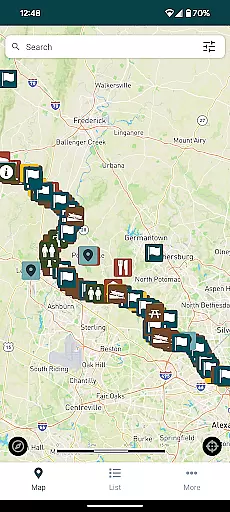
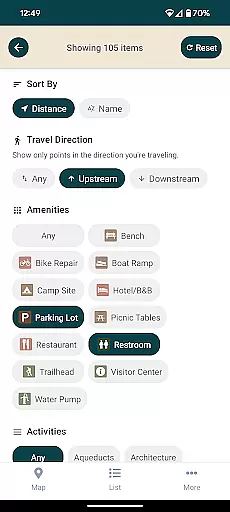
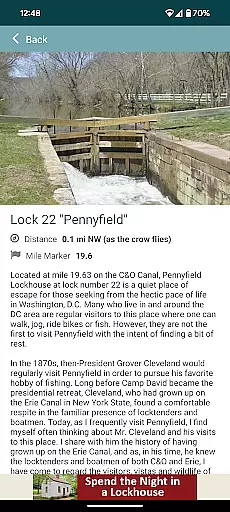
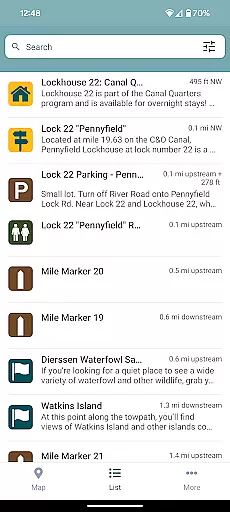
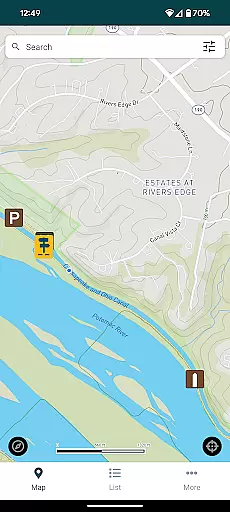
C&O Canal Explorer is a comprehensive navigation app designed to enhance your exploration of the entire 184.5-mile stretch of the C&O Canal National Historical Park. The app serves as an essential tool for outdoor enthusiasts, providing access to over 800 meticulously mapped points of interest. These include hiking trails, campgrounds, historical sites, trailheads, parking areas, and more, all presented in an easily searchable format.
One of the standout features of this app is its ability to calculate distances from your current location to nearby amenities and points of interest. This functionality ensures that users can efficiently plan their visits and make the most out of their time in the park. Whether you are a casual visitor or a dedicated explorer, C&O Canal Explorer encourages you to discover new paths and uncover hidden gems within the park, enriching your overall experience.
The C&O Canal Explorer app boasts a variety of features tailored to improve your navigational and exploratory capabilities within the C&O Canal National Historical Park. With over 800 points of interest available at your fingertips, users can effortlessly search and locate essential amenities such as hiking trails, campgrounds, historical landmarks, and parking areas. Each point of interest is carefully mapped, ensuring accuracy and reliability when planning your outdoor adventures.
In addition to its extensive mapping capabilities, the app provides real-time distance calculations from your current location to various points of interest. This feature allows for efficient trip planning and aids in optimizing your visit by highlighting nearby attractions. By leveraging these advanced functionalities, the C&O Canal Explorer app not only simplifies navigation but also inspires users to explore lesser-known areas of the park, making every visit unique and memorable.
Map accuracy is essential for any navigation app, and the C&O Canal Explorer excels in this area. The app provides precise mapping of over 800 points of interest along the 184.5 miles of the C&O Canal National Historical Park.
The detailed maps are designed to help users easily locate various amenities such as hiking trails, campgrounds, historical sites, trailheads, and parking areas. This ensures that visitors can plan their trips efficiently and find their way around the park without any hassle.
By delivering accurate location data, the app enhances the overall user experience, making it a reliable tool for both casual explorers and avid adventurers who rely on exact coordinates and well-marked locations.
Effective route planning is a core feature of the C&O Canal Explorer app, empowering users to explore the vast expanse of the C&O Canal National Historical Park with ease. The app calculates distances from your current location to nearby amenities and points of interest, streamlining trip planning.
With its intuitive interface, users can effortlessly chart their course through the park's diverse landscapes and numerous attractions. Whether you're planning a short visit or an extended journey, the app's route planning capabilities ensure you make the most of your adventure.
This functionality not only saves time but also enriches the exploration process by suggesting optimal paths and highlighting must-see locations, encouraging users to tread new paths and discover hidden gems within the park.
User-friendly interface
Extensive point database
Real-time distance calculator
Comprehensive maps
Encourages exploration
Limited to specific park
No offline maps
Occasional bugs
Requires internet
Heavy on battery

Start your next adventure confidently using our Accurate Compass App
 3.70
3.70
The fastest and most convenient way to pay for parking on our lots.
4.40
Easy, Moderate and difficult offroad adventures.
4.00
America’s largest public fast charging network, with over 500 charging stations.
4.50
Get directions, Maps, GPS navigation & GPS Maps using GPS App
4.10
NJ TRANSIT information and ticketing at your fingertips
3.70
Get route map navigation with 3D satellite view, and live earth camera streaming
3.70
Gas Station & Fuel Rewards Points
3.70
Explore Earth with live GPS, satellite view & street navigation
3.60
LIRR and Metro-North tickets and trips
4.80
GPS Speedometer & Odometer: Track car, bike, truck speed & distance in real-time
4.70
Park in Chicago, NYC, Boston, SF, Houston & more!
4.70
Neshan: map & navigation app with 20M+ monthly active users
4.50
GPS phone tracker, family locator, secure location sharing app
4.20
Navigate seamlessly with Real-Time Traffic, Offline Maps, and Voice Navigation.
4.10
TACNAV-X: Precision MGRS navigation, built specifically for the military.
4.00
Get real-time bus and train schedules for easy, hassle-free city transportation.
3.90
Live Satellite view app for find GPS navigation Direction and live location map
3.70
Find 93 Octane Gas: Locate Gasoline Stations Selling Premium 93 Octane or Higher
4.5


User Reviews