
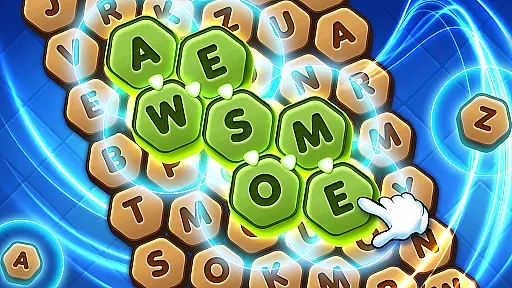
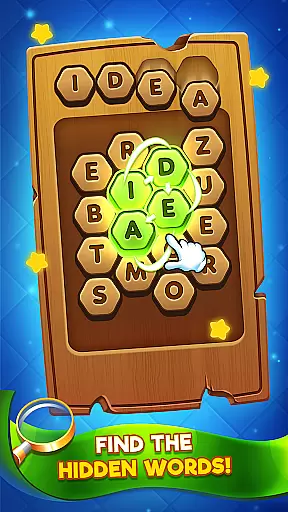

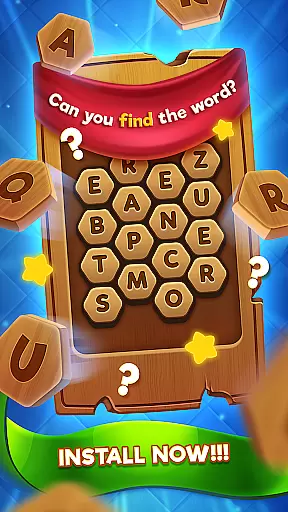
Word Seeker is an engaging word puzzle game designed to unlock your linguistic potential. The app challenges players to find hidden words across various chapters, with each chapter containing 10 progressively challenging levels. Suitable for word game enthusiasts, this app offers hours of entertainment through its diverse vocabulary and thematic word categories such as pets, foods, and machines.
A key feature is the helpful word hints displayed at the top middle of the screen, guiding players through more difficult puzzles. Additionally, the game includes three useful boosters - Search, Shuffle, and Star - that assist in uncovering elusive words. This combination of challenging gameplay, helpful tools, and varied word themes makes Word Seeker a valuable addition to any word gamer's library, enhancing both vocabulary and cognitive skills.
Word Seeker stands out with its well-structured gameplay divided into thematic chapters, each offering ten distinct levels. This organization provides a sense of progression and achievement as players advance through the game. The variety of word categories, including pets, foods, and machines, ensures a broad linguistic experience and keeps the gameplay fresh and engaging.
To aid players, Word Seeker offers three powerful boosters: Search, which highlights possible word locations; Shuffle, which rearranges letters for new perspectives; and Star, which reveals specific words. These boosters not only enhance the gaming experience but also help maintain player engagement during challenging puzzles. With its intuitive design and strategic aids, Word Seeker successfully combines education with entertainment, making it an ideal choice for users looking to improve their vocabulary while having fun.
Clue quality and clarity are essential components of any word search game, ensuring players can effectively engage with the puzzles. In Word Seeker, clues are thoughtfully designed to guide users without giving away solutions too easily.
The game provides thematic hints displayed prominently at the top middle of the screen, categorizing words into intuitive groups such as Pets, Foods, Machines, and more. This thoughtful organization helps players quickly grasp the context of each puzzle, making the gameplay both challenging and rewarding.
By offering clear categories, Word Seeker enhances the user's problem-solving skills while maintaining an enjoyable experience. Players appreciate the balance between challenge and assistance, which keeps them motivated to progress through various levels.
Puzzle variety is a standout feature in Word Seeker, providing players with diverse challenges across numerous levels. The game is structured into chapters, each containing ten unique levels that gradually increase in difficulty. This design ensures that players encounter a wide range of puzzles, preventing monotony and keeping engagement high.
In addition to varied word themes, Word Seeker incorporates three boosters: Search, Shuffle, and Star. These tools not only add layers of strategy but also introduce different ways to approach and solve puzzles. Whether you need help finding a tricky word or want to mix up the letter grid for new insights, these boosters enhance the overall gaming experience.
With its combination of thematic puzzles and strategic aids, Word Seeker offers a rich tapestry of challenges that cater to both casual players and dedicated word enthusiasts, ensuring long-lasting enjoyment.
Engaging word puzzles
Variety of word categories
Progressive chapter levels
Useful hint system
Three effective boosters
Limited booster availability
Ads between levels
In-app purchases required
Repetitive word themes
Occasional technical issues

Word search puzzle game for brain training
 4.70
4.70
Using letters and numbers, decode hidden words in this сryptogram game!
4.40
Word Trip – where players relax, solve word puzzles, and boost your brainpower!
4.90
Play word games to find as many words as you can. Use mode of crossword puzzles!
4.80
750 professional casual crosswords to keep you busy during coffee break.
4.10
The 2 player games of hangman: save the hangman! Hangman 2player come! Ahorcado!
4.90
Train your brain with word puzzle games for adults and enjoy word search offline
4.90
Relax your brain with this fun word puzzle game and beautiful landscapes!
4.50
Relax your mind with calming word puzzle games! A brain focusing game of words
4.90
Dive into the fun word puzzle games for adults! Train your brain with word games
4.80
Explore the world playing word puzzle games. Relax your brain by finding words
4.80
Relax, train your brain and improve your vocabulary with Word Search Journey
4.80
Unleash your inner codebreaker! Solve challenging cryptograms & word puzzles.
4.70
Better than Wordle, with Unlimited Words and No Daily Limit.
4.60
The classic word game with advanced AI and built-in definitions
4.60
Group words by category and solve relaxing association puzzles in a word game!
4.60
Mind-challenging word game — form words with letters and beat your opponent!
4.50
Word Solitaire: sort words by category in a relaxing word puzzle game!
4.40
Word search for watch. You can already wear your word search always at wrist!
3.30


User Reviews