
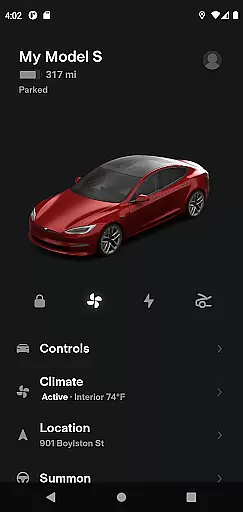
The Tesla app is a comprehensive lifestyle tool that allows vehicle owners to maintain constant contact with their Tesla cars and Powerwalls. This innovative application enables users to manage charging, climate control, security, navigation, and software updates remotely. With its intuitive interface, the app provides real-time monitoring and control over essential vehicle functions, making it an indispensable companion for Tesla owners.
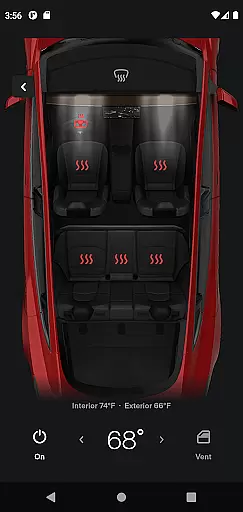
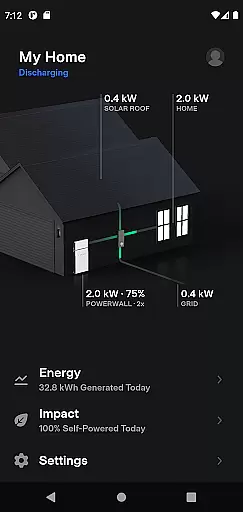
One of the standout features is the ability to precondition your car's temperature before you drive, ensuring comfort regardless of external conditions. Additionally, the app facilitates seamless interaction with Powerwall systems, allowing users to monitor energy storage, usage, and exportation. Whether you're at home or on the go, the Tesla app ensures you have complete control over your Tesla ecosystem.
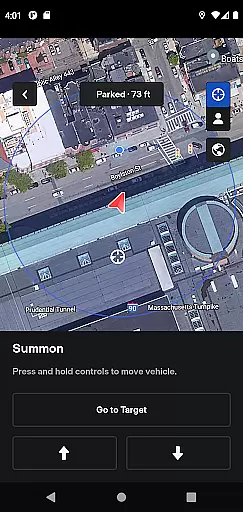
The Tesla app offers a wide array of features designed to enhance user convenience and vehicle management. Users can check the charging progress in real time and start or stop charging as needed. The remote lock and unlock feature provides peace of mind, while the vehicle locator helps you find your car with ease. These functionalities are complemented by the ability to summon your vehicle out of tight spaces if your car is equipped with Autopilot.
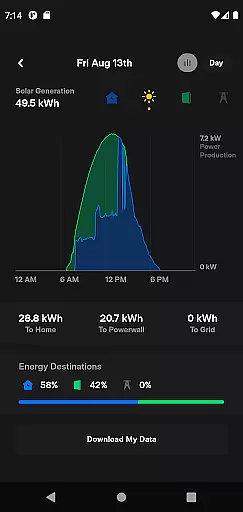
For media control, passengers can quickly adjust settings directly from the app. Owners can also flash the lights or honk the horn to locate their parked vehicles easily. Furthermore, the app supports Powerwall 2 users by offering detailed insights into solar energy production and battery usage. With these robust features, the Tesla app delivers a superior user experience that aligns perfectly with modern lifestyle needs.
The Tesla app offers an extensive range of features that cater to various aspects of a user's lifestyle, ensuring comprehensive coverage of needs for both vehicle and home energy management.
With functionalities ranging from real-time vehicle charging monitoring to climate control and even Powerwall energy storage oversight, the app ensures users have unparalleled control over their Tesla products.
This broad spectrum of services allows users to seamlessly integrate Tesla technology into their daily routines, enhancing convenience and efficiency in managing their electric vehicles and sustainable energy solutions.
All information provided through the Tesla app is sourced directly from your Tesla products, guaranteeing the highest level of content authenticity and accuracy.
By leveraging direct communication with vehicles and Powerwalls, the app delivers precise data on charging status, energy usage, and vehicle location, among other metrics.
This expert-level insight, backed by Tesla's cutting-edge technology and engineering prowess, empowers users with reliable and actionable information to optimize their Tesla experience.
User-friendly interface
Real-time vehicle monitoring
Remote climate control
Enhanced security features
Comprehensive energy management
Limited to Tesla owners
Requires internet connection
Powerwall 2 required for energy features
Autopilot needed for some functions
Potential privacy concerns

Pay your rent, submit work orders and much more with the RentCafe Resident App.
 4.70
4.70
Earn points with every purchase with Moe Rewards.
4.20
Use your device sensors to detect energy and convert it into spoken words.
4.10
Good magnifier app to see tiny things bigger and more clearly!
4.80
Play. Earn. Repeat. Get rewarded for playing mobile games. Welcome to Mobius!
4.80
Made To Order Faves
4.70
Colorful selection floral watch face with gyro for Wear OS
4.60
An Eerie Musical Trigger Toy for Spirits to Play with!
3.50
Share opinions, get paid cash
4.30
Simple, stylish & fresh watch face. Customize colors, gradients & complications.
4.70
Crochet made easy: step-by-step tutorials, beginner patterns & projects
4.60
This is a simple and highly functional alarm clock "Smart Alarm" paid version.
4.20
This minimalist yet classic board design brings a futuristic twist to your wrist
4.20
Easily manage your child's playtime, spending messaging and more.
3.50
Unique Dual Colors with 6 Custom Complications for Wear OS watches!
3.40
View over 160,000 line dance stepsheets from the CopperKnob website.
3.30
Turn your watch into a key fob for your Tesla
2.90
Big bold digital watch face with 30 colors, 6 complications and AOD.
4.0
Customize your Wear OS watch with festive Christmas figures and colors!
4.1


User Reviews