
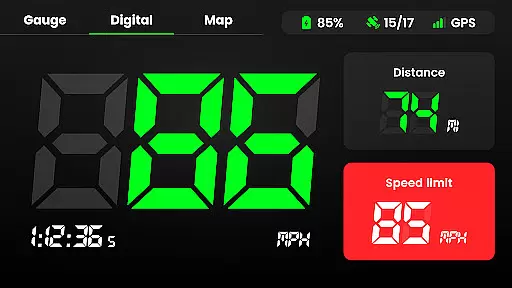
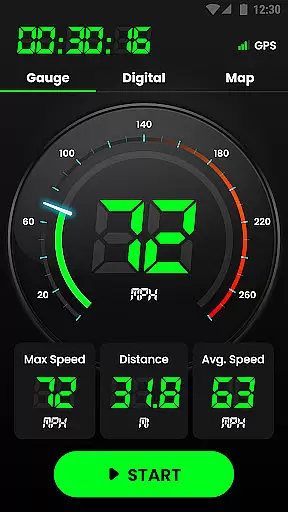
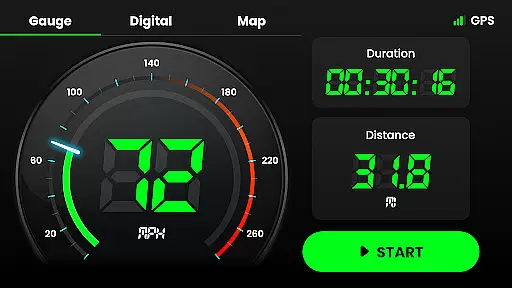
Speedometer is a highly accurate GPS-based speed tracking application designed to measure the velocity of various modes of transportation. Whether you're driving, cycling, or even walking, this app provides real-time speed updates and distance tracking in both digital and analog formats. The app's offline functionality ensures that users can track their speed and location even without an internet connection.
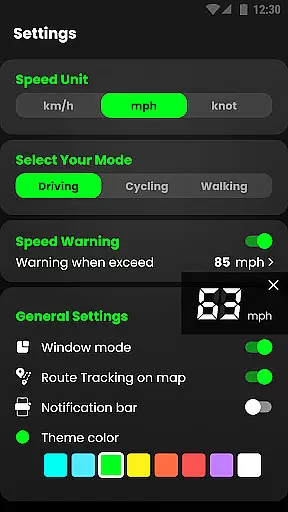
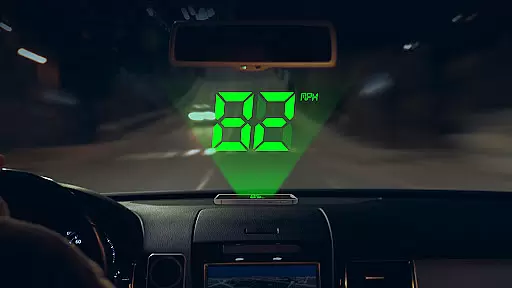
One of the standout features of Speedometer is its ability to alert users when they exceed predefined speed limits, ensuring safer travel. With its easy-to-use Heads-Up Display (HUD) mode, users can view their current speed mirrored on their car windshield, making it a reliable alternative to traditional vehicle speedometers. Additionally, the app offers multiple customization options such as switching between different units of speed measurement (km/h, mph, knots), choosing from various themes, and toggling between portrait and landscape modes.
Whether you're looking to monitor your daily mileage, test your speed during different activities, or replace a faulty car speedometer, Speedometer delivers a comprehensive solution with its intuitive interface and precise GPS navigation capabilities.
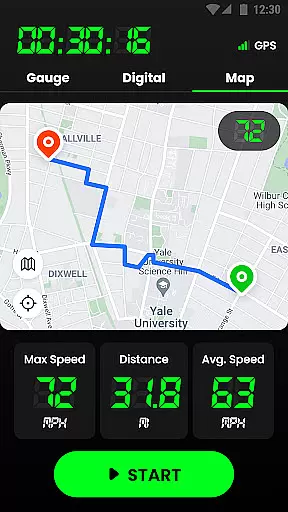
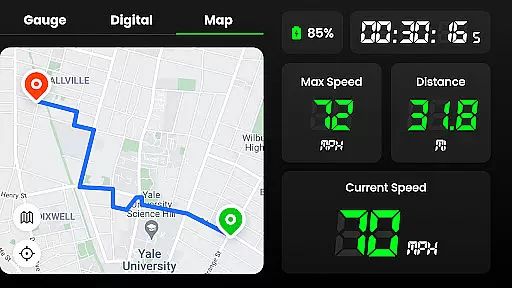
Speedometer stands out due to its rich feature set tailored for accuracy and user convenience. One of its core functionalities is the GPS navigation system, which tracks real-time location and journey routes on an interactive map. This allows users to not only see their current speed but also review their entire travel history with details like starting and ending points, average speed, maximum speed, and total mileage.
The app also includes advanced customization options, such as setting speed limit alerts. Users receive notifications via vibration, voice alerts, or alarms when they exceed the set speed limit, enhancing safety during travel. Another innovative feature is the Head-Up Display (HUD) mode, which mirrors the speedometer reading onto the windshield, providing a seamless driving experience. Furthermore, users can switch between different speed units (km/h, mph, knots) and choose from multiple attractive themes to personalize their interface.
Additional practical features include the ability to pause or reset journeys, display the speedometer as a small window over other apps, and use widgets to show speed directly in the notification bar. These thoughtful additions make Speedometer a versatile tool for anyone needing precise speed and distance measurements across various activities and vehicles.
Map accuracy is essential for any navigation or tracking application, and Speedometer excels in this area. The app utilizes advanced GPS technology to provide real-time location data with impressive precision. Whether you're driving, cycling, or walking, users can trust that their current position displayed on the map is both accurate and reliable.
The integration of GPS navigation allows Speedometer to not only show your location but also track every journey route intuitively on the map. This feature ensures that whether you're on a highway or navigating through city streets, the app provides an up-to-date reflection of your travels. With high-frequency updates, even fast-moving objects are tracked without delay.
For those who require detailed mapping for professional purposes such as surveying or logistics, Speedometer's commitment to accuracy means it can be depended upon. It offers peace of mind knowing that each movement is captured faithfully, allowing users to focus on their tasks without questioning the integrity of their tracking data.
Route planning is a critical component of any maps and navigation app, and Speedometer offers robust tools to ensure efficient travel. Users have access to multiple route options, which are calculated based on current traffic conditions, road closures, and other important factors that could affect their journey. This helps drivers make informed decisions about the best path to take.
In addition to offering alternative routes, Speedometer provides estimated time of arrival (ETA) for each option. By analyzing live traffic data, the app gives realistic predictions of travel times, empowering users to choose the most time-effective route. Moreover, if thereu2019s a change in traffic while en route, the app quickly recalculates and suggests a new optimal path.
Speedometer stands out by providing clear visual cues and voice guidance throughout the trip, ensuring that users never miss a turn. Its intuitive interface displays all necessary information at a glance, making route following effortless. Whether commuting daily or embarking on a long-distance adventure, Speedometer equips travelers with everything they need for smooth and stress-free navigation.
User-friendly interface
Accurate GPS tracking
Offline functionality
Customizable speed alerts
Multiple speed units
Battery consumption
Limited free features
Occasional GPS lag
No advanced analytics
Basic design

Offline maps & GPS for hiking, travel, fieldwork & outdoor adventures
 4.70
4.70
Explore a light pollution map to find suitable dark sky locations for observing.
4.30
Your guide to the recreational opportunities of the Bureau of Land Management!
3.40
Find EV & Tesla charging stations with PlugShare
4.70
Use GPS maps or search by property owner, address or parcel to view parcel data
4.30
LIRR and Metro-North tickets and trips
4.80
Get route map navigation with 3D satellite view, and live earth camera streaming
3.70
Live Satellite view app for find GPS navigation Direction and live location map
3.70
Explore offline maps with radar, satellite view, and real-time alerts.
3.60
This app is military GPS coordinate systems helper. (MGRS, UTM & DMS Maps)
4.80
Bolt is a ride-hailing app for requesting fast, safe, and affordable transport
4.80
Navigate MTA, NJ Transit, MBTA, SEPTA, BART, MARTA, CTA & 900+ cities
4.60
The fastest and most convenient way to pay for parking on our lots.
4.40
Turn your Android device into a real off-road GPS using off-line topo maps!
4.40
ParkWhiz, an Arrive Mobility brand, part of the Arrive Network
4.30
Get matched with a nearby driver — you’ll be on your way in minutes.
4.30
Lets explore the world's famous places by using Live Cams, GPS & Satellite View.
4.20
Find routes fast with GPS Maps, GPS Navigation & driving directions.
4.10
Discover over 800 points of interest along the canal.
3.70


User Reviews