
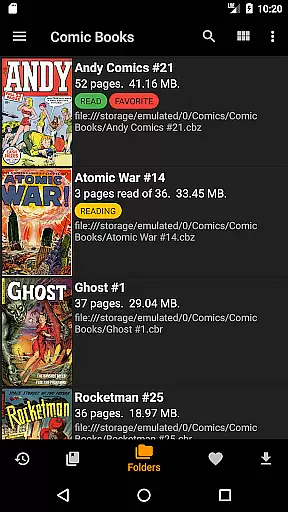
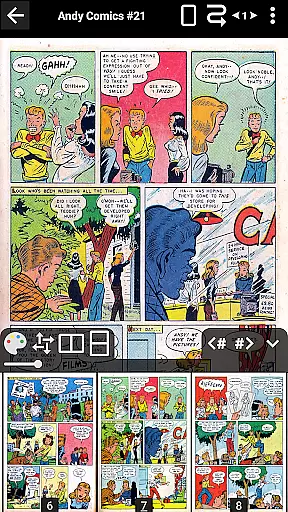
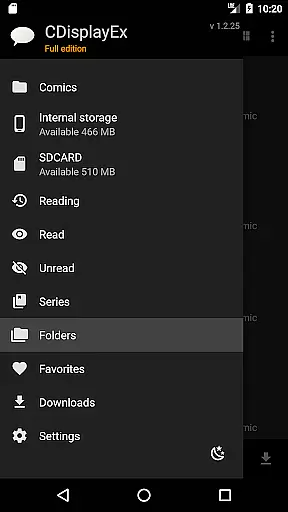
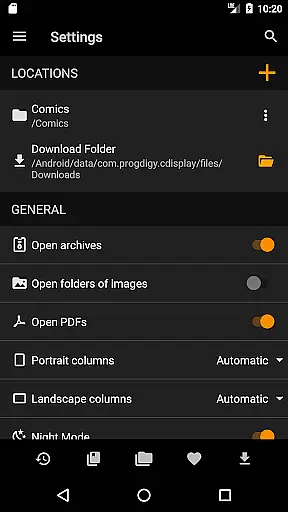
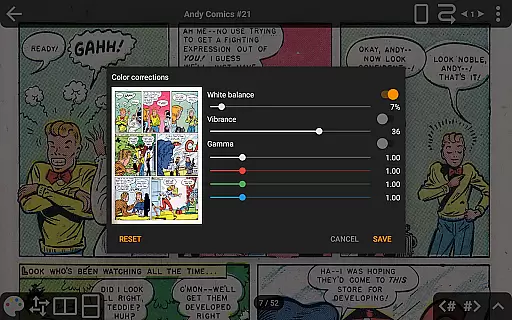
CDisplayEx Comic Reader is a premier comic book reading application designed for both casual readers and dedicated collectors. This app supports all major comic formats including CBR, CBZ, and PDF files, making it the most versatile reader on the market. Its hallmark feature is the ability to load comics instantly, providing a seamless and comfortable reading experience. The app also offers advanced features such as continuous page scrolling in both horizontal and vertical orientations, and sophisticated scaling options that enhance user interaction with each page.
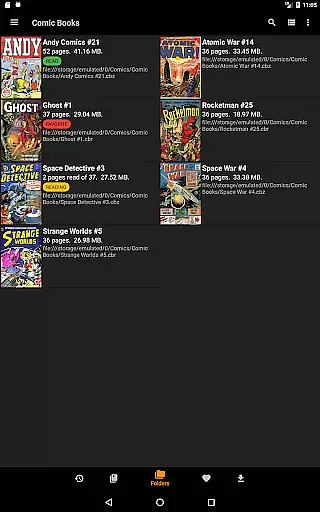
Beyond its core functionality, CDisplayEx provides users with an integrated library management system. This allows users to organize their collections by series or track their next read seamlessly. Additionally, the app supports network file access through Samba, enabling users to preload comics onto their devices without downloading entire files. With support for cloud services like OneDrive and Dropbox in the Pro version, CDisplayEx ensures your library is accessible wherever you go.
The app's intuitive interface and customizable settings make it suitable for various reading environments. Whether you're at home or commuting, CDisplayEx delivers a top-tier reading experience tailored to your preferences. From bookmarking capabilities to night mode, every feature is crafted to maximize comfort and usability, ensuring that users can enjoy their favorite comics without interruption.
CDisplayEx Comic Reader stands out with its comprehensive feature set tailored for comic enthusiasts. One of its key features is the support for multiple comic formats such as CBR, CBZ, and PDF, which ensures compatibility with virtually any digital comic library. The app's instant loading capability means users can dive into their comics without delay, while advanced page scaling options allow precise control over how pages are displayed, enhancing readability.
In addition to format versatility, CDisplayEx offers innovative navigation features. Continuous page scrolling in both horizontal and vertical directions caters to different reading styles, providing a fluid experience. The Pro version unlocks further functionalities like accessing cloud storage services such as OneDrive, Dropbox, and Mega, allowing users to manage their libraries across devices effortlessly. Moreover, the app includes an image export function and S-Pen support, catering to users who require additional customization and precision.
Library management is another strong suit of CDisplayEx. Users can browse through folders or utilize the integrated library system to organize comics by series. An intelligent recommendation engine suggests the next album to read, while an integrated search function helps locate specific volumes quickly. With added benefits like night mode, language selection, and ad-free browsing, CDisplayEx ensures a personalized and uninterrupted reading experience.
CDisplayEx Comic Reader offers an extensive and versatile comic library that caters to a wide array of preferences. The application supports all popular comic book formats, including .cbr, .cbz, and .pdf files, ensuring that users can access their favorite comics without compatibility concerns.
The integrated library management system allows users to organize their collections efficiently. By simply indicating where your comics are stored, the reader groups them by series or suggests the next album to read in your collection. This feature not only enhances the user experience but also simplifies navigation through vast libraries.
An integrated search function enables users to find specific volumes instantly, making it easy to locate a particular comic or series. With support for Manga and other comic types, CDisplayEx ensures that readers have access to a diverse range of content, satisfying both casual readers and dedicated enthusiasts alike.
Authenticity and proper licensing are crucial aspects of any digital content platform, and CDisplayEx Comic Reader takes these matters seriously. The app provides users with access to legally obtained comics from various sources such as Onedrive, Dropbox, Komga, Kavita, and Mega in its Pro version.
By supporting direct connections to network shares and allowing users to preload files onto their devices, CDisplayEx ensures that all content is accessed legally and with proper authorization. This approach not only respects copyright laws but also supports creators by promoting legitimate distribution channels.
Furthermore, the application's commitment to content authenticity is evident in its ability to load comic books immediately and provide a fluid reading experience. Users can trust that they are accessing genuine content that has been properly licensed for digital consumption, enhancing their overall satisfaction and confidence in using the app.
Instant comic loading
Multiple format support
Advanced scaling options
Integrated library system
Cloud service integration
No Google Drive access
Pro version costs
Limited free features
Interface complexity
Occasional bugs

Anime TV App: Watch all anime online,anime tv subtitles online with big anime tv
 3.80
3.80
TMOLector is an app to read all kinds of manga and stories!
4.50
Pocket Toons: Free Webtoons, Comics, & Manga - New Chapter Drops Everyday
4.30
The anime tv for fans Sud and Dub
4.20
Browse and read all your comics and mangas from YACReaderLibrary
4.20
Artists wanting to use decent hand reference on the go, this app is for you!
4.70
from HipComic: Value Your Comic Book Collection with Just the Snap of a Photo.
3.80
Official from Japan
4.80
The largest manga, comics, and manhwa community with millions of fans!
4.50
Read comics & manga
4.70
Find free mangas in Spanish
4.70
Comics and stories from Japan
4.60
Scan comics instantly! Find comic value, price, and key collector details fast.
4.50
Manga reader for manga, manhua, manhwa & webtoon, online & offline, update daily
4.50
Webtoons, comics, web novels, and e-books are all here! RIDI, my own space to enjoy stories
4.30
Read latest manga with this minimal reader with NO ADS.
4.30
Kodansha official Manga app
4.30
Comic Scanner - Book Value - Identify and sell your comic collection with AI.
3.80
Your key to unlocking manga and webtoons on the go
3.50


User Reviews