
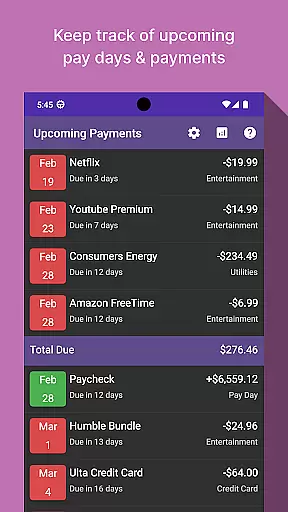
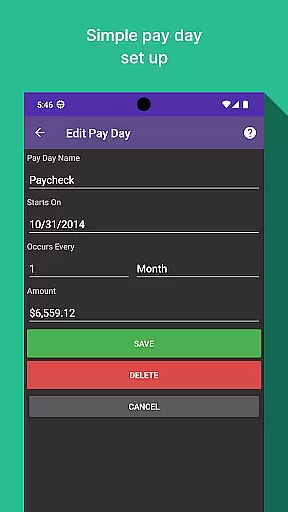
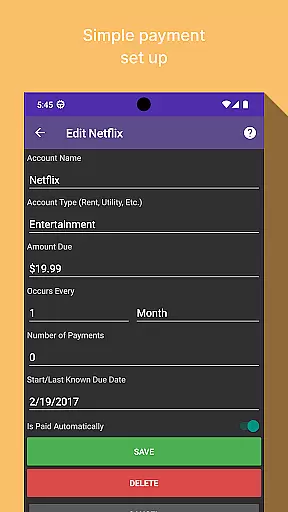
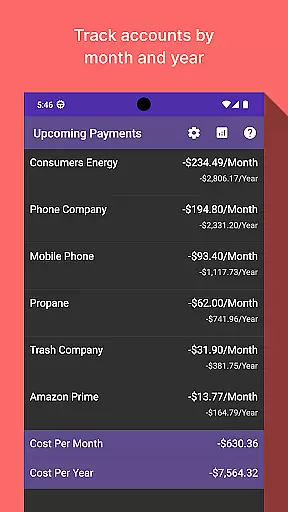
Bill Manager is a comprehensive financial management application designed to help users efficiently track and manage their upcoming bills. The app's core functionality revolves around bill tracking, ensuring users never miss a payment deadline. It provides detailed information on pending bills from the current date up to the next payday, including payment amounts and due dates.
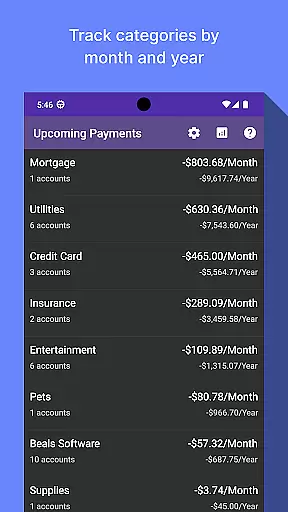
A key feature of Bill Manager is its analytics view, which offers valuable insights into spending patterns. Users can analyze costs by category and account on a monthly and yearly basis. This helps individuals better understand their financial habits and make informed budgeting decisions. Whether you're managing personal expenses or monitoring shared household bills, this app provides the tools needed to stay financially organized.
Bill Manager stands out with its robust set of features tailored for effective bill management. The app's primary feature is its intelligent bill tracking system, which automatically calculates which bills are still due based on the current date and your next payday. This ensures users always know exactly what needs to be paid and when.
The analytics functionality is another standout feature, providing detailed breakdowns of expenses across different categories and accounts. Users can view their spending patterns month-by-month and year-by-year, helping them identify areas where they can optimize their budget. Additionally, the app includes customizable notifications that alert users about upcoming payments, giving them ample time to prepare. These features work together to create a comprehensive financial management solution that empowers users to take control of their finances.
When it comes to financial applications, security is paramount. Bill Manager ensures that your personal and financial data remains protected through advanced encryption protocols. This means that all your bill information, payment details, and analytics are safeguarded against unauthorized access.
The app employs multi-layer authentication processes to verify user identity, adding an extra level of security. By integrating biometric login options such as fingerprint or facial recognition, it provides a secure yet convenient way for users to access their information. These features ensure that only authorized individuals can view or manage sensitive billing data.
Moreover, regular security updates and vulnerability assessments help maintain the integrity of the application. Users can trust that their financial planning and bill tracking activities are protected by industry-standard security measures. This commitment to security allows users to focus on managing their finances without worrying about data breaches.
A seamless transaction experience is crucial for any finance application, and Bill Manager excels in this area. The app provides real-time notifications for upcoming bills, ensuring users never miss a payment deadline. This feature not only helps in avoiding late fees but also assists in maintaining a good credit score.
Users can easily view detailed transaction histories, categorized by month and year. This functionality offers a clear overview of spending patterns and helps in making informed financial decisions. The analytics view presents this data in an intuitive manner, allowing for better financial planning and budget management.
In addition, the app's user-friendly interface simplifies the process of tracking bills and payments. With clear visual indicators for due dates and payment statuses, users can efficiently manage their financial obligations. This streamlined transaction experience empowers users to take control of their finances with minimal effort.
User-friendly interface
Comprehensive bill tracking
Detailed analytics view
Customizable notifications
Secure data management
Limited free features
No automatic bill payment
Occasional syncing issues
Subscription fees apply
Learning curve for new users

 4.50
4.50
Secure, simple money transfer app. Send money to Mexico and worldwide fast.
4.80
Retirement plan, IRA, retail and HSA customers serviced by Empower.
3.10
PayMe helps you claim money from settlements on companies that harmed you.
4.80
Early payday & cash advances with no-fee mobile banking!
4.60
Put crypto to work & earn rewards. Stake crypto like Ethereum, Solana & Cardano
4.40
Mine Bitcoin in the cloud! Earn BTC daily with high-speed mining power.
4.30
Join 12M+ users. Instant cash advances, personal loans, build credit, save money
4.80
Navigate your unique financial path confidently with help from Credit Karma.
4.70
Wells Fargo Mobile allows you to access your investment and bank accounts.
4.80
All expenses at a glance.
4.80
Military retirement pay estimation calculator
4.70
Powerful Money Manager, Expense & Savings Tracker, Budget Planner - Pro Version
4.70
Cash Advance, Credit Cards, Credit Lines, Score Monitoring, Saving, Budgeting
4.70
Payday cash advance & Instant cash advance: Borrow money instantly, Get cash now
4.60
Insurance that's quick and easy to buy and use—anytime, anywhere.
4.60
Save, spend & get paid faster²
4.50
Make your paycheck work harder for you with Perpay.
4.10
StockTiles lets you view prices & charts of your favorite stock assets
2.30


User Reviews