
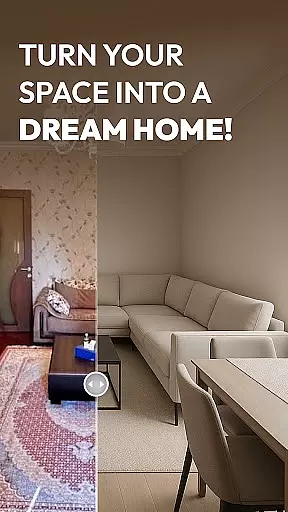
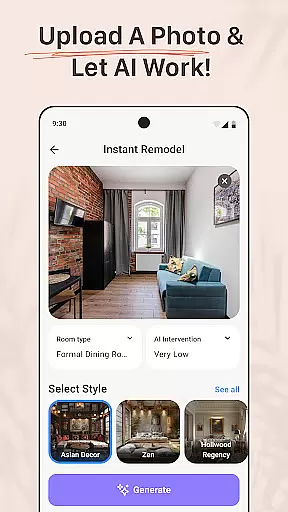
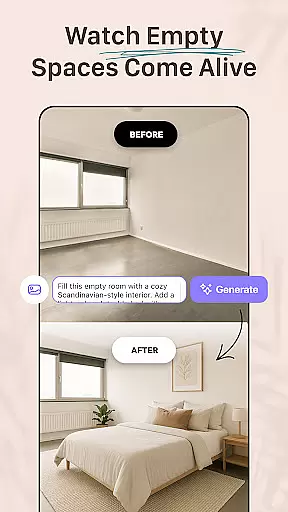
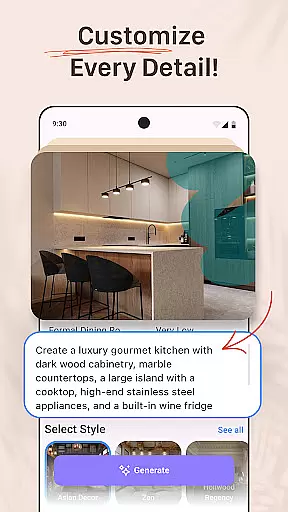


AI Remodel is a cutting-edge AI-powered home design application that enables users to plan, design, and visualize their dream spaces with professional precision. The app provides an intuitive platform for creating accurate floor plans and immersive 3D renderings without requiring prior design experience. Whether remodeling a single room or redesigning an entire home, AI Remodel offers full creative control over every detail.
One of the standout features of AI Remodel is its advanced interior design AI tools. These tools guide users through every stage of their home renovation project, from suggesting layouts and color palettes to recommending furniture placement and material combinations. With smart AI functionality, users can confidently experiment with new styles and preview changes before committing to any physical alterations.
The app also integrates seamlessly with Planner 5D, ensuring high-resolution designs and precise measurements. This makes it ideal for homeowners, renters, and professional designers alike. Whether planning a DIY project or presenting concepts to clients, AI Remodel combines powerful room AI interior design capabilities with user-friendly tools to bring creative visions to life.
AI Remodel stands out with its robust feature set tailored for modern interior creators. One of its core functionalities is the interactive Room Planner 3D tool, which allows users to drag, drop, and rotate furniture and decor in a fully responsive 3D environment. This feature ensures that users can explore their ideas with complete creative freedom while maintaining accuracy in their designs.
In addition to its 3D planning capabilities, AI Remodel leverages advanced AI algorithms to suggest layouts, color schemes, and furniture arrangements based on uploaded photos or new designs. Users can experiment with curated styles or generate custom combinations, blending minimalism with boho aesthetics or testing mid-century layouts. This flexibility empowers users to explore diverse design options without limitations.
Another key feature is the seamless integration with Planner 5D, which enhances precision and control. Users can scale designs accurately, measure spaces in real time, and export high-resolution plans. These tools are particularly beneficial for professionals who need polished mockups to present to clients, as well as for DIY enthusiasts looking to test layout ideas before making significant changes.
When it comes to home renovation and design, having accurate and reliable property information is crucial. AI Remodel ensures that all property listings are meticulously verified through advanced algorithms and cross-referencing with trusted data sources. This verification process guarantees that users have access to authentic and up-to-date property details.
The app employs a multi-layered verification system that checks the consistency of uploaded photos, floor plans, and other property specifics. By doing so, AI Remodel provides users with confidence in the legitimacy of their chosen properties, ensuring that their design projects start on solid ground.
Users benefit from this rigorous approach as they can make informed decisions based on trustworthy information. Whether planning a single room makeover or an entire home renovation, knowing that the foundational property details are accurate allows for more precise and realistic design outcomes.
AI Remodel goes beyond just designing spaces; it offers comprehensive home management features that streamline the renovation process. From creating detailed project plans to tracking progress and managing resources, the app acts as a central hub for all home improvement activities. These features ensure that every aspect of the renovation is accounted for and efficiently organized.
The integration with Planner 5D enhances these capabilities by providing real-time updates and seamless synchronization across devices. Users can easily adjust layouts, experiment with different materials, and visualize changes instantly. This level of control empowers homeowners, renters, and designers alike to execute their visions with precision and ease.
Ultimately, these home management tools save time and reduce stress by offering a clear overview of the project timeline and budget. With AI Remodel's robust feature set, users can focus on bringing their creative ideas to life while the app handles the logistical complexities of home renovation.
User-friendly interface
Advanced AI suggestions
High-quality 3D rendering
Seamless Planner 5D integration
Versatile design options
Steep learning curve
Limited free features
Occasional glitches
Premium subscription cost
Heavy on system resources

Map-based search app for apartments and homes for rent.
 4.60
4.60
Make Renting Easy
4.40
Universal TV remote Control for Roku TV brands via WiFi remote
4.1
B-hyve Pro App for landscape irrigation professionals
4.70
An awesome mobile app for Home Security Surveillance - uses ZoneMinder
3.20
Download today to join the community to help bring lost pets home faster.
4.70
Plants, Beauty, Collectibles
4.60
Find your next home, house, apartment, condo, casa, flat, rental, studio, or bed
4.70
A Smarter Home in Seconds
4.70
View houses and apartments for rent, updated daily.
4.80
Home Ideas | Renovation Advice | Local Pros. Go From Dream to Home with Houzz.
4.70
Tailored Care Guides For Houseplants, Indoor Plants, Garden Plants & Flowers.
4.60
Rent on-the-go with TurboTenant’s app made just for renters
4.50
Security App with HD Video, 2-way Audio, and event detection for Home monitoring
4.40
Make your phone a surveillance camera remote with a home camera app for Android!
4.40
The official app for Home Assistant. Control your home anywhere in the world.
4.30
Book your local plumber 24/7, track your service order & get exclusive coupons
4.00
Our app allows Sunrun customers to monitor systems, pay bills, and get support.
3.80
Draw house plans, floor plans 3d & house design with house plan drawing 3d app
3.60


User Reviews