

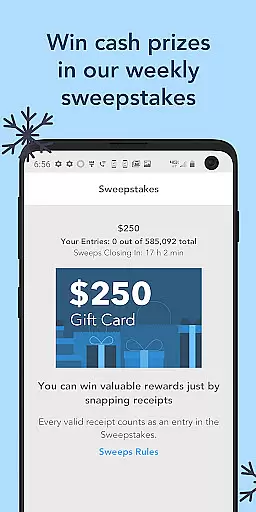
Receipt Pal: Scan for Rewards is a shopping app that allows users to turn their receipts into rewards. The core functionality revolves around scanning both paper and e-receipts, which then earns users points. These points can be redeemed for gift cards from major retailers like Amazon, Walmart, and Target. Additionally, each valid receipt submission enters users into weekly sweepstakes to win cash prizes.
Beyond receipt scanning, the app offers extra ways to earn points such as taking surveys and playing games through its Arcade feature. This multi-faceted approach ensures users have multiple avenues to accumulate points faster. Whether you're shopping for groceries or buying home goods, ReceiptPal makes every purchase count by offering tangible rewards.
The app is particularly useful for regular shoppers who want to maximize their spending by earning free rewards. By simply scanning receipts after purchases, users can fetch valuable gift cards and even get chances to win larger cash bonuses, making it an appealing tool for those looking to save money while shopping.
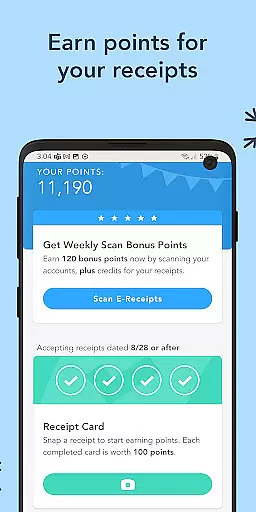
Receipt Pal: Scan for Rewards stands out with several unique features designed to enhance user engagement and reward accumulation. One of the primary features is the ability to scan both paper and e-receipts. Users simply snap a photo of their receipts or connect their email accounts to submit e-receipts, filling up green Point Cards that translate into redeemable points.
In addition to receipt scanning, the app includes an Arcade section where users can download and play games to earn extra points. Each game has levels and tasks that, when completed, contribute to the user's overall point tally. This gamification aspect adds an entertaining twist to the traditional receipt scanning model.
Furthermore, ReceiptPal integrates survey-taking as another method to earn points. The combination of these features—scanning receipts, playing games, and taking surveys—ensures that users have varied and continuous opportunities to gather points, redeem them for valuable gift cards, and participate in cash prize sweepstakes, thus maintaining high user interest and participation.
Product variety and categorization are essential for any shopping app, ensuring users can easily find and choose from a wide range of items. Receipt Pal: Scan for Rewards offers an impressive selection of rewards and gift cards from various renowned retailers such as Amazon, Visa, Walmart, Target, Home Depot, and Lowes.
The app's interface is designed to help users navigate through different categories effortlessly. By scanning both paper receipts and e-receipts, users can earn points that contribute towards filling up their green Point Cards. Each completed card translates into valuable gift cards, enhancing the overall user experience by providing diverse redemption options.
Moreover, Receipt Pal goes beyond traditional receipt scanning by incorporating surveys and games, adding another layer of engagement. This multifaceted approach not only broadens the product variety but also ensures that users have multiple avenues to earn rewards, making it a versatile tool in the shopping category.
Pricing transparency and competitiveness are crucial factors that influence user trust and satisfaction in shopping apps. Receipt Pal: Scan for Rewards excels in this area by offering clear and straightforward earning mechanisms. Users can easily track their progress through the app's intuitive point system, where each valid receipt contributes to filling up a green Point Card.
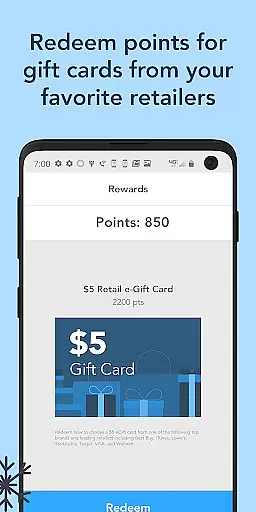
The app provides competitive rewards by allowing users to redeem their points for gift cards from top retailers. This direct correlation between scanned receipts and tangible rewards ensures that users feel they are getting fair value for their participation. Additionally, the inclusion of weekly sweepstakes with cash prizes adds an extra incentive, boosting the perceived value of using the app.
Furthermore, Receipt Pal maintains transparency by clearly outlining how points are earned and redeemed. Whether through submitting e-receipts, taking surveys, or playing games, users understand exactly what they need to do to maximize their earnings. This openness fosters trust and encourages continued use, setting Receipt Pal apart in terms of pricing transparency and competitive reward structures.
User-friendly interface
Multiple earning methods
Wide range of gift card options
Weekly cash prize sweepstakes
Engaging Arcade feature
Points system may be slow
Requires consistent effort
Limited to selected retailers
Occasional app glitches
Privacy concerns with e-receipts

Measure your PD and try on frames virtually | Gift yourself the perfect pair!
 4.80
4.80
Save with Coupons and Promotions
4.90
Play store promo codes for apps + Appsfree + app sales + paid app sales
4.40
Cash back on everything you need! Join now to start earning cash back!
4.60
New styles & exclusive offers
4.80
Save with Kroger! Coupons, ads, rewards, find stores & shopping list in one app!
4.50
Get paid to shop groceries & more when you become an Instacart shopper.
4.20
Unlock the latest from Nike & Jordan. Shop sneakers & apparel for all athletes.
4.70
A world-leading B2B marketplace
4.40
Envío en 24h con las mejores oportunidades: electrodomésticos, electrónicos y +
4.80
Shop latest fashion trends with fast shipping & thousands of new styles weekly.
4.80
Flexible payments, big savings
4.80
Shop the latest items & unique used goods. Sell pre-loved items and earn money.
4.70
BJ’s mobile app provides smart & easy ways to get the most from your Membership.
4.70
Online Marketplace: Resell vintage clothing, thrift & shop second hand items
4.70 4.60
4.60
E-commerce Wholesale Marketplace: Shop and save on all your business supplies
4.40
Buy shoes, apparel, and luxury items. Shop and discover the latest sneakers!
4.40
Grooming, Training & Shopping
3.80
Complete Bath & Body Works app review covering product selection, rewards program, exclusive deals, and shopping features. Your fragrance shopping guide.



User Reviews