
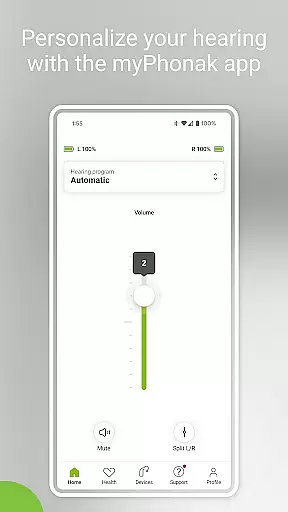
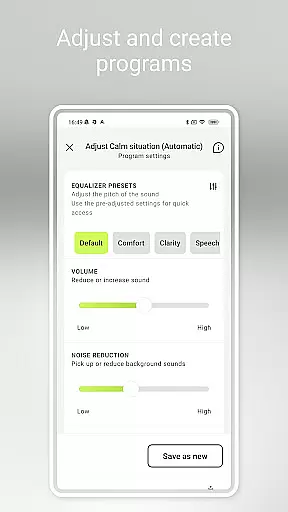
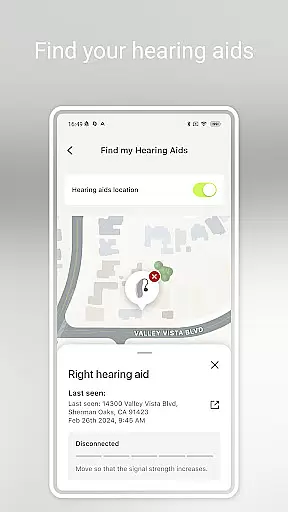
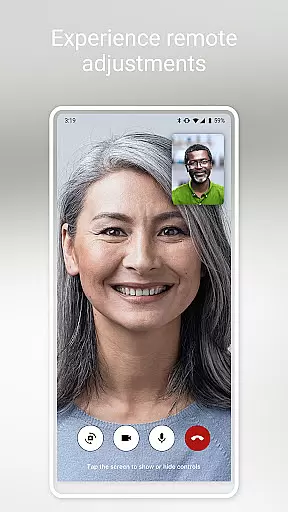
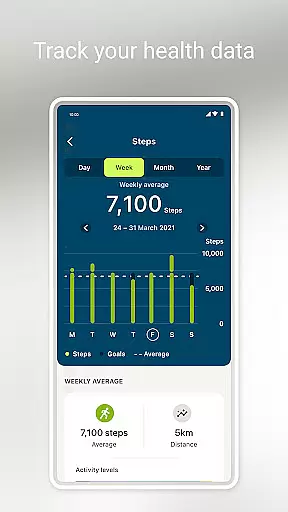
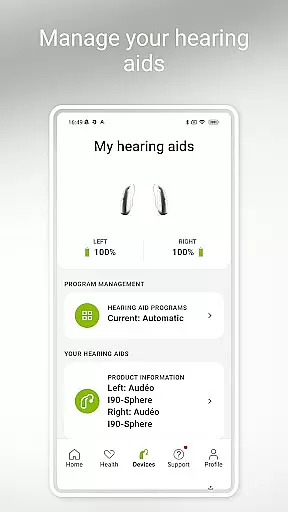
myPhonak is a comprehensive hearing aid management application designed for users of Phonak hearing aids. The app offers advanced remote control features, allowing users to adjust volume, noise reduction, microphone directionality, and equalizer settings to suit different listening environments. With Remote Support functionality, users can connect with their hearing care professionals via live video calls for remote adjustments. Additionally, the app provides health tracking features such as step counting, activity levels, heart rate monitoring, and more, depending on the device model.
The application is compatible with various Phonak hearing aid models that support Bluetooth connectivity, including Audéo Fit, Lumity, and Paradise series. myPhonak also supports integration with Apple Health when connected to compatible hearing aids. This feature-rich app ensures a personalized and seamless hearing experience while offering valuable health insights, making it an essential tool for Phonak hearing aid users seeking convenience and customization.
myPhonak stands out with its extensive feature set tailored specifically for Phonak hearing aid users. One of the key highlights is the Remote Control functionality, which allows users to make precise adjustments to their hearing aids. These include modifying volume levels, switching between pre-defined programs, and fine-tuning sound characteristics through an equalizer with presets like comfort, clarity, and softer. Users can also personalize their experience further by adjusting bass, middle, and treble sliders.
Another notable feature is Remote Support, enabling users to schedule appointments with their hearing care professionals and receive remote adjustments through live video calls. The app also tracks various health metrics such as steps, wearing time, activity levels, heart rate, and distance walked, depending on the hearing aid model. Furthermore, myPhonak includes practical tools like Tap Control configuration, cleaning reminders, and real-time information on battery levels and connection statuses of hearing aids and accessories. These robust features collectively enhance user convenience and provide a highly customizable hearing experience.
In the realm of medical applications, content credibility is paramount. myPhonak stands out by offering users access to enhanced hearing controls and personalization options for Phonak hearing aids, all reviewed and approved by hearing care professionals. This ensures that every feature, from noise reduction to microphone directionality, meets high medical standards.
The app's Remote Support function allows users to connect with their hearing care professionals via live video calls for remote adjustments. This feature not only enhances convenience but also guarantees that any changes made are supervised by experts, maintaining a high level of professional oversight and reliability.
Furthermore, myPhonak provides numerous health tracking features such as step counting, activity levels, and heart rate monitoring, specifically designed for compatibility with certain Phonak devices. These health metrics are gathered using medically recognized methods, ensuring accuracy and dependability in line with expert recommendations.
By integrating with Apple Health and supporting a wide range of Phonak hearing aids, myPhonak delivers a comprehensive solution that is both versatile and trustworthy. Users can be confident that they are receiving information and functionalities vetted by experts in the field of audiology, making informed decisions about their hearing health.
Teleconsultation has become an essential aspect of modern healthcare, and myPhonak excels in providing high-quality remote consultations. Through its Remote Support feature, users can engage in live video calls with their hearing care professionals, ensuring personalized attention without the need for physical appointments.
This teleconsultation service is designed to offer clear and reliable communication, allowing for precise adjustments to hearing aids based on real-time feedback. The ability to discuss individual needs and preferences during these sessions ensures that each user receives tailored advice and modifications specific to their situation.
Moreover, the scheduling flexibility offered by myPhonaku2019s teleconsultation services accommodates busy lifestyles, enabling users to arrange appointments at their convenience while still receiving professional guidance. This approach significantly enhances accessibility to expert care, particularly beneficial for those with mobility issues or living in remote areas.
With compatibility across various devices and stringent security measures in place, myPhonak guarantees a seamless and secure teleconsultation experience. By prioritizing ease of use alongside robust privacy protections, it sets a benchmark for quality in digital healthcare interactions.
User-friendly interface
Comprehensive hearing controls
Remote professional support
Health tracking integration
Wide device compatibility
Limited to Phonak devices
Advanced features not available on older models
iOS version restrictions
Bluetooth connectivity required
Health features vary by device

We’ve made it easy for Oscar members to get care on the go.
 4.30
4.30
HealtheLife lets you easily manage your health online.
3.20
Elegant, easy-to-use period tracker for fertility, PMS symptoms, and more
4.90
Manage your prescriptions and pharmacy care anytime, anywhere.
4.80
Zepbound & Mounjaro support & resources for savings, tracking & more
3.90
This app is simply 1 book (also large app) and 17 other apps combined into 1
4.70
The world's best selling 3D Human Anatomy app with groundbreaking 3D technology
2.00
Discover the source of pain with Muscle Trigger Point Anatomy.
4.70
Tap & save. Coupons that fit in your pocket. Find low prices on prescriptions.
4.80
Want to make it easier to manage your health? We’re with you, wherever you are.
4.70
Enables quick access to medical data and contacts in case of emergency (ICE)
4.70
Coaches you through labour using hypnobirthing techniques & tracks contractions
4.70
Hear far away sounds, conversations, TV and surrounding sounds more clearly.
4.70
Sync your blood glucose device, log values automatically and tame your diabetes!
4.60
ASCCP Management Guidelines- There’s an app for that!
4.60
Identify pills, search different drugs, get drug information and much more!
4.50
Use the phone microphone or headset mic as sound amplifier for louder hearing.
4.30
Good for You. Great for Life.
4.00
MHealth is the mobile version of MEDITECH’s Patient and Consumer Health Portal.
3.10


User Reviews