
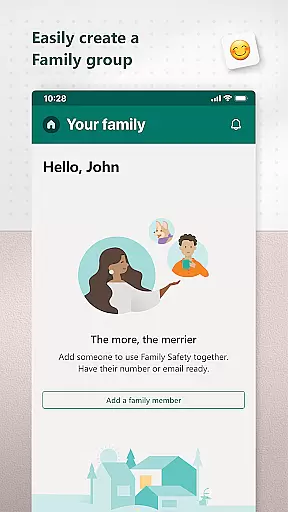
Microsoft Family Safety is a comprehensive parenting app designed to help families develop healthy digital habits while ensuring children's safety online. The app provides parents with essential tools to manage their kids' screen time, set content filters, and monitor activity reports across multiple devices including Android, Xbox, and Windows.
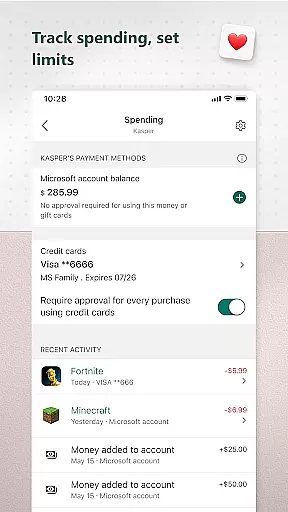
One of the key features is the ability to set app and game time limits, helping children maintain a balanced digital lifestyle. Parents can also establish kid-friendly browsing environments by filtering inappropriate websites on Microsoft Edge. With weekly activity reports delivered via email, the app facilitates open conversations about digital habits between parents and children.
This app is particularly useful for modern families who want to provide their children with digital independence while maintaining necessary safeguards. By combining robust parental controls with insightful activity tracking, Microsoft Family Safety enables parents to create a safer digital environment for their loved ones.
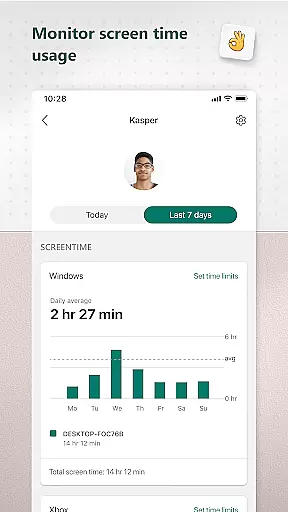
Microsoft Family Safety offers an impressive array of features that cater to both parents and children. The app's activity reporting system provides detailed insights into screen time usage and online activity patterns, helping families build healthier digital habits. Parents receive weekly summary emails that break down their children's digital interactions, making it easier to discuss online behavior.
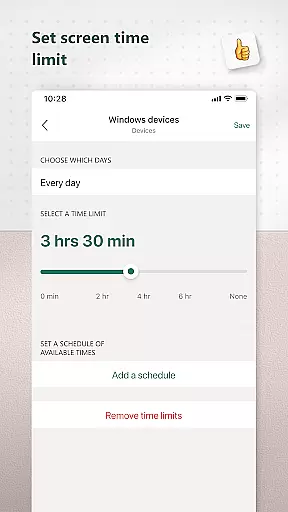
The screen time management feature stands out with its flexible control options. Parents can set specific time limits for individual apps and games across different platforms, including Xbox, Windows, and Android devices. The app also enables device-level time restrictions, allowing parents to control overall screen time across multiple devices simultaneously.
Content filtering capabilities ensure children access only age-appropriate material. The web filtering function works specifically with Microsoft Edge to block inappropriate websites, while the app filtering system prevents downloading or using unsuitable applications. These features work together to create a comprehensive safety net for children's digital exploration.
Microsoft Family Safety provides a reliable and credible solution for parenting in the digital age. The app is designed with input from experts in child safety and digital wellness, ensuring that the features offered are both effective and appropriate for families.
The app's content filters are developed based on industry standards for age-appropriate material, allowing parents to set up kid-friendly browsing environments on Microsoft Edge. These filters help block inappropriate apps and games, providing an additional layer of security as children explore online content.
Activity reports offer insights into screen time and online usage, which are crucial for understanding your familyu2019s digital habits. This feature not only empowers parents but also helps kids develop healthier relationships with technology by fostering open conversations about their online activities.
With regular updates and improvements driven by user feedback and advancements in technology, Microsoft demonstrates its commitment to maintaining high standards of content credibility and expert validation within the Family Safety app.
Growth tracking in Microsoft Family Safety is centered around helping parents monitor and guide their children's digital development accurately. By setting specific limits on app usage and screen time across devices such as Xbox, Windows, and Android, the app allows for precise control over how much time children spend engaging with digital media.
Parents receive detailed activity logs that outline exactly what apps have been used and for how long. This data supports informed decision-making regarding adjustments to screen time allowances or restrictions on certain types of content, promoting balanced digital lifestyles.
When a child requests more time beyond the set limits, parents are promptly notified. This real-time communication ensures that any extensions granted align with established family guidelines while still offering flexibility when needed.
By combining these tools with weekly email summaries, Microsoft Family Safety enables ongoing assessment of each childu2019s progress toward developing responsible tech habits, making it easier than ever to track growth accurately over time.
Comprehensive cross-platform support
Robust parental control options
Detailed activity reporting
Flexible screen time management
Strong privacy protection policies
Limited browser compatibility
Requires child consent
No iOS support
Complex setup process
Some features need premium subscription

Fake call application designed for parents and adults to discipline their children through the children's police.
 4.20
4.20
Pregnancy and baby formula tips for moms, plus Enfamil coupons & cash back
4.10
Magic chalkboard coloring and drawing!
4.20
A simple way to track your baby’s breastfeeding, diaper changes, sleep patterns.
4.90
Live Location, Alerts & 2-Way Voice for Kids and Adults with Special Needs
4.60
Lullabies, Night Light & Age-based Routines to help your baby fall asleep
4.1
Keep track of your stored breastmilk
4.40
All-In-One Pregnancy Tracker, Your Baby's Milestones, Growth Stages & Parenting.
4.90
Advanced baby tracking, expert sleep help & parenting support for every stage.
4.80
Track baby’s development & growth week by week with BabyCenter’s pregnancy app!
4.90
Kids story books for children. Baby reading books with audio for pre-k toddlers
4.70
Sleep better with white noise app! Discover rain sounds, fan noise and more.
4.70
The Most Trusted Co-Parenting App.
4.60
All-in-one pregnancy app, contraction timer, kick counter & due date calculator
4.40
Join over 1MM parents & professionals who've used OFW to navigate co-parenting
4.40
Free symptom & med tracker with expert-reviewed tips.
4.30
Find unique + popular baby names for your little peanut.
4.30
A Coloring for the Whole Family! Discover the Joy of Family Love Through Colors!
3.60
AI Motion Video Maker & Ideas
4.0


User Reviews